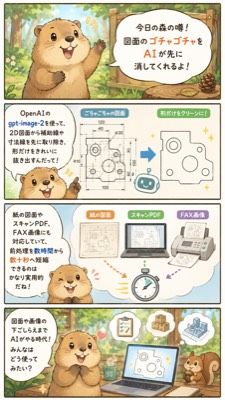
Cute CAD Cleanup Explainer Comic
Generates a vertical Japanese-style mascot infographic explaining how AI cleans cluttered 2D technical drawings for faster document preparation.
This is a gpt-image-2 prompt case for Illustration & Art. Use the copy-ready prompt below to generate similar visuals, and review YouMind OpenLab awesome-gpt-image-2 attribution plus commercial-use rights before reuse.
This prompt is designed for multiple reference images. We will open Dovoo with the prompt and the available preview image; add the remaining references in Dovoo before generating.

Prompt
Copy-ready prompt
{"type":"Vertical Japanese-style infographic","style":"Cute 2D watercolor storybook illustration with soft ink lines, warm forest tones, rounded speech bubbles, light cream background, and a friendly business tech style","format":{"aspect_ratio":"9:16 Vertical smartphone poster","panel_count":4,"layout":"Four stacked rectangular panels separated by thin dark borders"},"main_character":{"species":"Raccoon or tanuki mascot","appearance":"Round beige body, dark ears and paws, cream-colored snout and belly, large, shiny eyes, a happy open mouth expression, and expressive little hands","role":"Friendly forest storyteller explaining AI workflow"},"theme":"Using..."{argument name="AI tool name" default="gpt-image-2"} Preprocess 2D drawings by removing guide lines, dimension lines, titles, and handwritten annotations, leaving only clean shapes. "visible_text":{"top_title":"Today's forest rumor! AI can help you clean up clutter on your drawings!","tool_label":"I heard that using OpenAI's gpt-image-2 can remove guide lines and dimension lines from 2D drawings, making them easier to read!","middle_caption":"Supports paper drawings, scanned PDFs, and fax formats. Even drawings with handwritten annotations from clients can be quickly organized.","bottom_caption":"AI-assisted drawing organization. This usage is becoming increasingly common!" "},"layout":{"sections":[{"title":"Introduction to Forest Legends","position":"Top Panel","count":1,"description":"A raccoon stands in a sunny forest, next to a wooden sign-shaped speech bubble announcing that AI can first erase the messy drawing content."},{"title":"CAD Cleanup Before and After Comparison","position":"Second Panel","count":3,"labels":["Left Tool Name Description Speech Bubble","Middle Messy 2D Mechanical Drawing Filled with Dimensions and Construction Marks","Right Simplified Clean Outline Drawing Retaining Only the Main Shapes"],"description":"A blue arrow points from the messy drawing to the extracted clean shape; a small glitter marker and a miniature robot icon emphasize the automation process."},{"title":"Document Input Example","position":"Third Panel","count":4,"labels":["Paper Drawings","Scanned PDF","Fax Format","Stopwatch Icon"],"description":"Three document cards show acceptable sources, including paper drawings, scanned PDFs..."} And fax format, colored arrows pointing to a stopwatch to suggest faster preprocessing speed; a raccoon smiles in the lower left corner"},{"title":"AI Assisted Work Scene","position":"Bottom Panel","count":5,"labels":["Raccoon Narrator","Laptop Displaying Cleaned Drawings","Floating List Document","Floating Like Badge","Squirrel Assistant"],"description":"A raccoon sits at a desk in the forest, an open laptop displaying cleaned technical shapes with helpful icons floating above, a squirrel watching on the right"}]},"art_direction":"Keeps all Japanese text legible, uses a rounded sans-serif font, light blue and cream UI panels, small glitter, simple CAD-style line drawings, a cozy woodland background with trees and sunshine, and cute productivity infographics suitable for social media","customization":{"headline":"{argument name="headline text" default="Today's forest tale! AI can help you clean up the clutter on your blueprints first!"} ","mascot":"{argument name="mascot animal" default="Raccoon"} ","workflow_result":"{argument name="cleanup result" default="Remove guide lines and dimension lines, keeping only the main shape."} "}}Prompt variables
Editable argument placeholders found in the prompt, with their default values.
Reuse and source notes
Use this prompt safely after previewing the case.
- 1.Copy the prompt or open it directly in Dovoo with the generation button.
- 2.Adjust variables, aspect ratio, and reference images for your own use case.
- 3.Before publishing or paid usage, verify source rights, attribution requirements, and brand or likeness risks.
Can I use this prompt commercially?
Commercial-use status is unknown. Review the original source, license, brand constraints, and legal requirements before paid usage.
Where does this case come from?
This case is imported from YouMind OpenLab awesome-gpt-image-2; keep attribution visible and check the source URL before reuse.