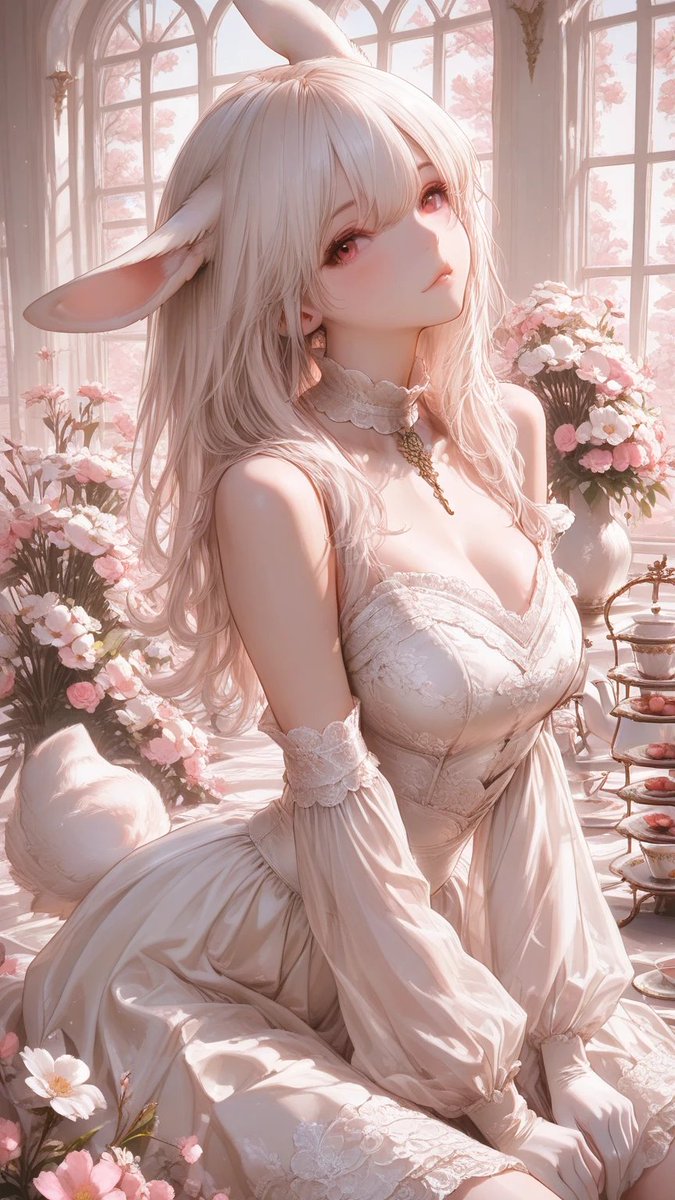
Pastel Bunny Girl Conservatory Portrait
Generates a romantic vertical anime portrait of a lace-dressed bunny girl in a flower-filled sunlit conservatory for fantasy character art.
This is a gpt-image-2 prompt case for Portrait & Character. Use the copy-ready prompt below to generate similar visuals, and review YouMind OpenLab awesome-gpt-image-2 attribution plus commercial-use rights before reuse.
Prompt
Copy-ready prompt
Create a vertical 9:16 romantic fantasy anime illustration of an elegant anthropomorphic bunny girl in a sunlit Victorian conservatory. She is seated gracefully in three-quarter view, with long wavy {argument name="hair color" default="pale blush pink"} hair, tall soft rabbit ears, a fluffy white rabbit tail, fair luminous skin, and a large opaque dusty-rose square censor block covering the entire face area. She wears an ornate {argument name="dress color" default="ivory white"} lace corset dress with a sweetheart neckline, delicate embroidered floral patterns, a fitted bodice, flowing skirt, off-shoulder puff sleeves, lace wrist cuffs, white gloves, a frilled choker, and a small gold pendant chain. The setting is filled with arched glass windows, warm morning sunlight, soft pink flowering trees visible outside, bouquets of pale pink and white flowers in vases, scattered blossoms in the foreground, and a small tiered tea tray with pastries and teacups on the right. Use dreamy pastel colors, glowing backlight, delicate rim lighting, soft bloom, highly detailed fabric folds, lace texture, translucent petals, elegant fantasy romance mood, polished anime art style, ultra-detailed digital painting, shallow depth of field, no text.Prompt variables
Editable argument placeholders found in the prompt, with their default values.
Variable
hair color
Default
pale blush pink
Variable
dress color
Default
ivory white
Reuse and source notes
Use this prompt safely after previewing the case.
- 1.Copy the prompt or open it directly in Dovoo with the generation button.
- 2.Adjust variables, aspect ratio, and reference images for your own use case.
- 3.Before publishing or paid usage, verify source rights, attribution requirements, and brand or likeness risks.
Can I use this prompt commercially?
Commercial-use status is unknown. Review the original source, license, brand constraints, and legal requirements before paid usage.
Where does this case come from?
This case is imported from YouMind OpenLab awesome-gpt-image-2; keep attribution visible and check the source URL before reuse.