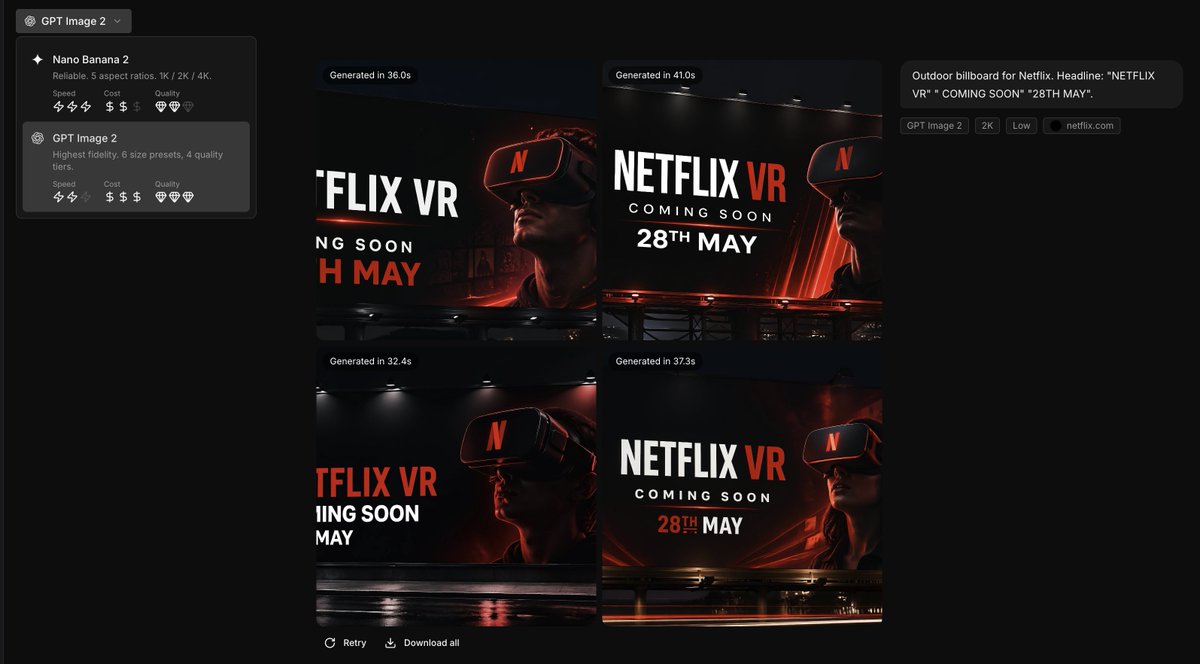
Brand Guide to Ad Concepts UI
This prompt transforms a brand style reference into a polished AI creative-tool screenshot that showcases four on-brand billboard ad concepts for marketing presentations or product demos.
This is a gpt-image-2 prompt case for 产品商业. Use the copy-ready prompt below to generate similar visuals, and review YouMind OpenLab awesome-gpt-image-2 attribution plus commercial-use rights before reuse.

Prompt
Copy-ready prompt
Using the provided reference images as a brand style guide, generate a dark-toned creative application interface, displayed in a 2x2 grid format.{argument name="brand name" default="Netflix"} Four billboard concepts were generated. The precise brand color palette and overall visual identity system from the reference images were applied: a deep black background, red accents, white typography, charcoal gray overlays, and a clean, modern sans-serif font style. The reference images were transformed from a static brand setup page into an image generation results screen. The left sidebar contained a model selector with two model cards, and the main canvas displayed four generated concept thumbnails. Each thumbnail should be a cinematic nighttime outdoor billboard model with dramatic lighting, glossy reflections, and a person wearing a VR headset. Eye-catching billboard copy was used, with the content {argument name="headline text" default="NETFLIX VR"} ,{argument name="subheadline text" default="COMING SOON"} as well as{argument name="date text" default="28TH MAY"} Add small UI labels and descriptions on the right to summarize the prompts, and add generation time badges above the four images. Ensure the final result has the quality of a screenshot from a high-end creative tool used for brand ad brainstorming.Prompt variables
Editable argument placeholders found in the prompt, with their default values.
More cases in this category
Prioritized by category, input mode compatibility, quality, and lower risk.






Reuse and source notes
Use this prompt safely after previewing the case.
- 1.Copy the prompt or open it directly in Dovoo with the generation button.
- 2.Adjust variables, aspect ratio, and reference images for your own use case.
- 3.Before publishing or paid usage, verify source rights, attribution requirements, and brand or likeness risks.
Can I use this prompt commercially?
Commercial-use status is unknown. Review the original source, license, brand constraints, and legal requirements before paid usage.
Where does this case come from?
This case is imported from YouMind OpenLab awesome-gpt-image-2; keep attribution visible and check the source URL before reuse.