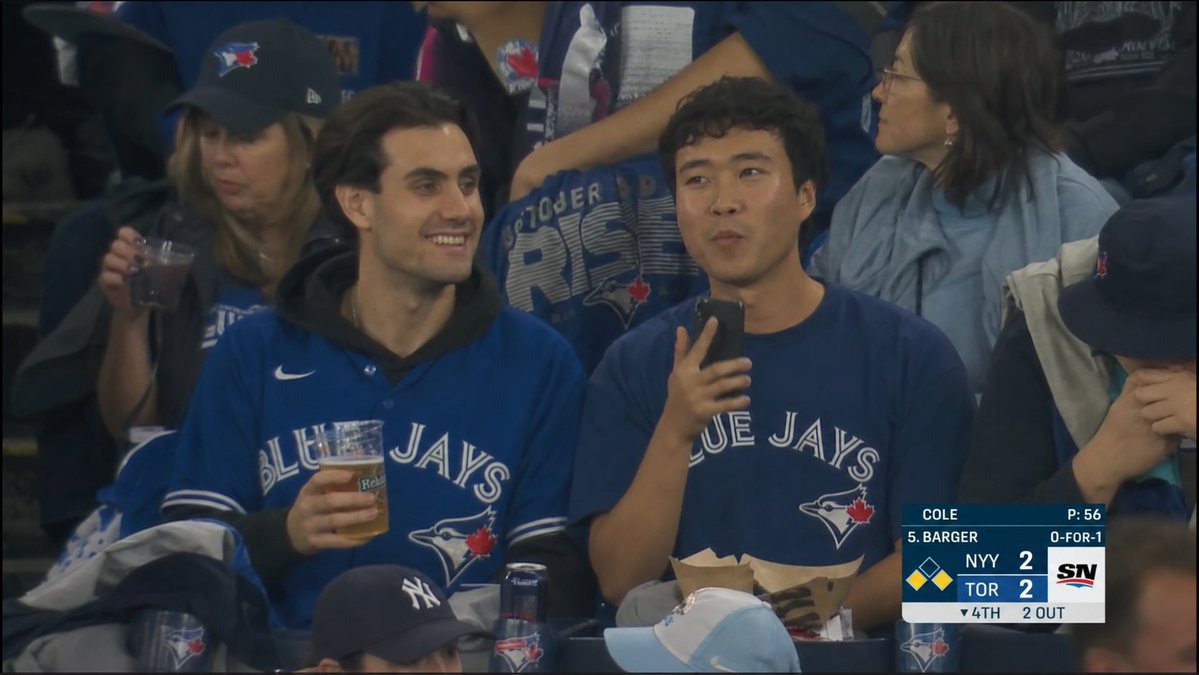
Blue Jays Broadcast Crowd Screenshot
Generates a realistic televised baseball crowd cutaway at a Toronto Blue Jays game with anonymized faces and a Sportsnet-style scorebug.
This is a gpt-image-2 prompt case for Other Inspiration. Use the copy-ready prompt below to generate similar visuals, and review YouMind OpenLab awesome-gpt-image-2 attribution plus commercial-use rights before reuse.
Prompt
Copy-ready prompt
{
  "type": "Photorealistic screenshots of live sports broadcasts",
  "scene": "A snapshot taken at a Toronto Blue Jays baseball game, framed to mimic a television broadcast shot, taken at night under stadium lights, pointing directly at the lower stands. The image has a slightly compressed, smoky broadcast quality, accompanied by a light haze, soft contrast, dark vignetting, and realistic motion blur.",
  "camera_and_style": {
    "aspect_ratio": "16:9 widescreen",
    "quality": "Broadcast-quality MLB broadcast stills",
    "framing": "A close-up shot of the spectators in the stands, showing fans sitting side by side.",
    "lens": "Long-focus stadium camera, flat perspective",
    "color_palette": "Dark navy blue, black shadows, cool gray stadium seats, warm skin tones, white scoreboard graphics"
  },
  "main_subjects": {
    "count": 3,
    "description": "In the foreground, three key Toronto Blue Jays fans sit in adjacent stadium seats.",
    "left_fan": "A woman wearing a black Toronto Blue Jays baseball cap and blue fan gear, holding a clear plastic cup containing a dark-colored beverage around her neck.",
    "center_fan": "A young man, wearing a royal blue Toronto Blue Jays jersey over a black hoodie, is holding a beer and appears relaxed.",
    "right_fan": "A young man, wearing a navy blue Toronto Blue Jays T-shirt, is holding a smartphone in one hand and has a paper food tray on his lap."
  },
  "background": {
    "crowd": "The dense crowd behind them, all dressed in Blue Jays uniforms, included a man in the middle behind the main fan wearing an October Rise Blue Jays shirt, a man on the right wearing a grey jacket, and parts of the hat and shoulders at the bottom edge.",
    "team_branding": "The Toronto Blue Jays logo is visible on the jerseys, hats, shirts, and cups; there is a partial New York Yankees hat in the lower right foreground."
  },
  "privacy_obscuration": {
    "count": 5,
    "style": "A flat, opaque, medium-brown rectangular block covers the face, simulating privacy anonymization.",
    "locations": [
      "Left foreground female face",
      "Mid-foreground male face",
      "Male face in the foreground on the right",
      "Female face in the background (top right corner)",
      "The audience's face at the bottom center"
    ]
  },
  "broadcast_graphics": {
    "position": "bottom right corner",
    "network_logo": "SN",
    "scorebug_components_count": 9,
    "details": [
      "Pitcher information: COLE and P:56",
      "Batter information: 5. BARGER and 0-FOR-1",
      "Away Team Score: NYY 2",
      "Home team score: TOR 2",
      "Bases diagram, with yellow runners at first and second base.",
      "Inning number indication: ▼ 4TH",
      "Outs count indicator: 2 OUT",
      "Dark blue and white rectangular graphic panel",
      "Right side Sportsnet SN flag block"
    ]
  },
  "text_to_show": {
    "team_text": "{argument name=\"team jersey text\" default=\"BLUE JAYS\"}",
    "score_away": "{argument name=\"away score text\" default=\"NYY 2\"}",
    "score_home": "{argument name=\"home score text\" default=\"TOR 2\"}",
    "inning": "{argument name=\"inning text\" default=\"▼ 4TH\"}",
    "network": "{argument name=\"network logo text\" default=\"SN\"}"
  },
  "composition": "The core fans should occupy the main focus of the frame, with the scoreboard partially covering the lower right corner of the seats. Maintain a candid and natural feel to the scene, like a real television broadcast cut during a shot break. Avoid creating a studio-photograph or illustration style."
}
Prompt variables
Editable argument placeholders found in the prompt, with their default values.
Variable
team jersey text
Default
BLUE JAYS
Variable
away score text
Default
NYY 2
Variable
home score text
Default
TOR 2
Variable
inning text
Default
▼ 4TH
Variable
network logo text
Default
SN
Reuse and source notes
Use this prompt safely after previewing the case.
- 1.Copy the prompt or open it directly in Dovoo with the generation button.
- 2.Adjust variables, aspect ratio, and reference images for your own use case.
- 3.Before publishing or paid usage, verify source rights, attribution requirements, and brand or likeness risks.
Can I use this prompt commercially?
Commercial-use status is unknown. Review the original source, license, brand constraints, and legal requirements before paid usage.
Where does this case come from?
This case is imported from YouMind OpenLab awesome-gpt-image-2; keep attribution visible and check the source URL before reuse.