Bilingual Prompt Comparison Gallery
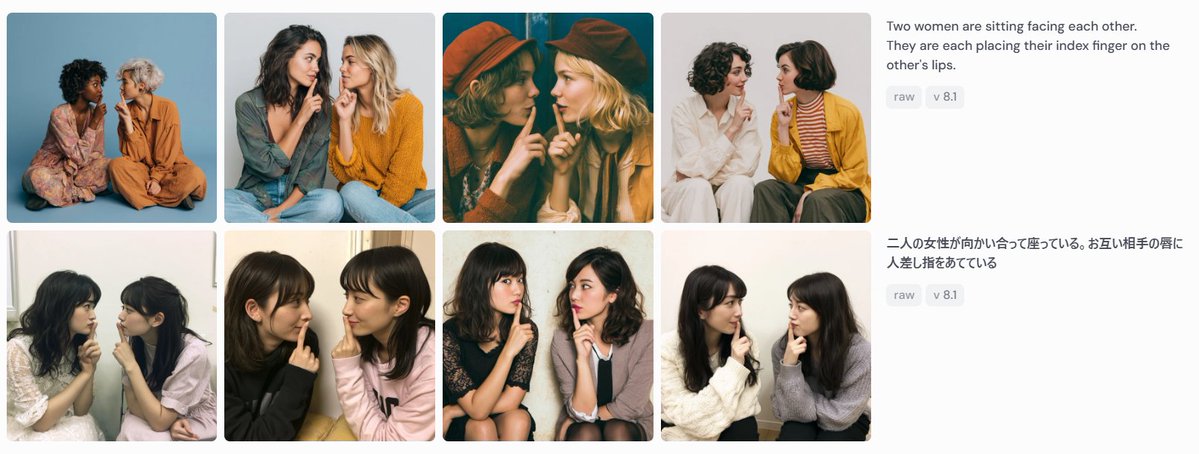
Creates a screenshot-like gallery comparing eight generated images from English and Japanese versions of the same prompt.
This is a gpt-image-2 prompt case for Other Inspiration. Use the copy-ready prompt below to generate similar visuals, and review YouMind OpenLab awesome-gpt-image-2 attribution plus commercial-use rights before reuse.
Prompt
Copy-ready prompt
Objective: Create a widescreen screenshot-style comparison panel showcasing the image results generated by the same cue word in two languages. Canvas: Use a 1199×461 pixel horizontal composition with a very light gray or off-white background, similar to a social media screenshot or a web showcase. Layout: The left 75% area features a 2x4 showcase containing 8 rounded-corner photo cards with narrow white gaps between them. Each card is a nearly square portrait of two women sitting together, facing each other or leaning inwards, each placing an index finger to the other's lips in a shared "shh" gesture. The right 25% area contains two stacked cue word description blocks, aligned with the two rows of the showcase. Showcase Details: Contains 8 different generated photo cards: 1. Top Left: Two women sitting in front of a blue studio background, one wearing a floral dress and the other an orange outfit. 2. Second from the top row: Two women in casual sweaters, one with dark hair and the other with blonde hair, sitting together against a light gray background. 3. Top row, third: Warm, cinematic cyan/orange tones image; two women wearing hats, faces obscured by large, softly blurred rectangles. 4. Top row, fourth: Two women against a white background; one in white, the other in a mustard yellow cardigan with a striped shirt. 5. Bottom left: Two young women seated by an indoor window in soft, casual snapshot lighting. 6. Bottom row, second: Two young women in black and light pink tops in a casual close-up indoor portrait. 7. Bottom row, third: Two young women seated in chairs; one in a dark dress, the other in a light-colored cardigan, against a plain wall background. 8. Bottom row, fourth: Two young women in white and gray sweaters seated in front of a light-colored indoor wall. Face Treatment: All visible faces on all 8 cards should be anonymized by covering the facial areas with soft rectangular mosaic/blur blocks to match a screenshot-like privacy masking effect. Right-side Text: Display English prompt text in the top right corner:{argument name="English prompt text" default="Two women are sitting facing each other. They are each placing their index finger on the other's lips."} Below this are two small, round, gray labels that read "raw" and "v 8.1" respectively. Below that, aligned with the second line, the Japanese prompt text is displayed:{argument name="Japanese prompt text" default="Two women are sitting facing each other, each with their index finger on the other's lips."} Below this, place two identical gray labels, one reading "raw" and the other "v 8.1". Visual Style: Photorealistic generated image thumbnails, varied lighting and clothing, clean UI spacing, rounded corners, dark gray sans-serif interface text, and small light gray capsule labels. The overall image should resemble a screenshot of a consistent contrast grid, rather than a meticulously retouched poster. Constraints: Use 8 photo cards, 2 text blocks, and a total of 4 capsule labels. Do not add logos, watermarks, browser borders, descriptive text within photo cards, or additional UI elements.Prompt variables
Editable argument placeholders found in the prompt, with their default values.
Variable
English prompt text
Default
Two women are sitting facing each other. They are each placing their index finger on the other's lips.
Variable
Japanese prompt text
Default
Two women are sitting facing each other, each with their index finger on the other's lips.
Reuse and source notes
Use this prompt safely after previewing the case.
- 1.Copy the prompt or open it directly in Dovoo with the generation button.
- 2.Adjust variables, aspect ratio, and reference images for your own use case.
- 3.Before publishing or paid usage, verify source rights, attribution requirements, and brand or likeness risks.
Can I use this prompt commercially?
Commercial-use status is unknown. Review the original source, license, brand constraints, and legal requirements before paid usage.
Where does this case come from?
This case is imported from YouMind OpenLab awesome-gpt-image-2; keep attribution visible and check the source URL before reuse.