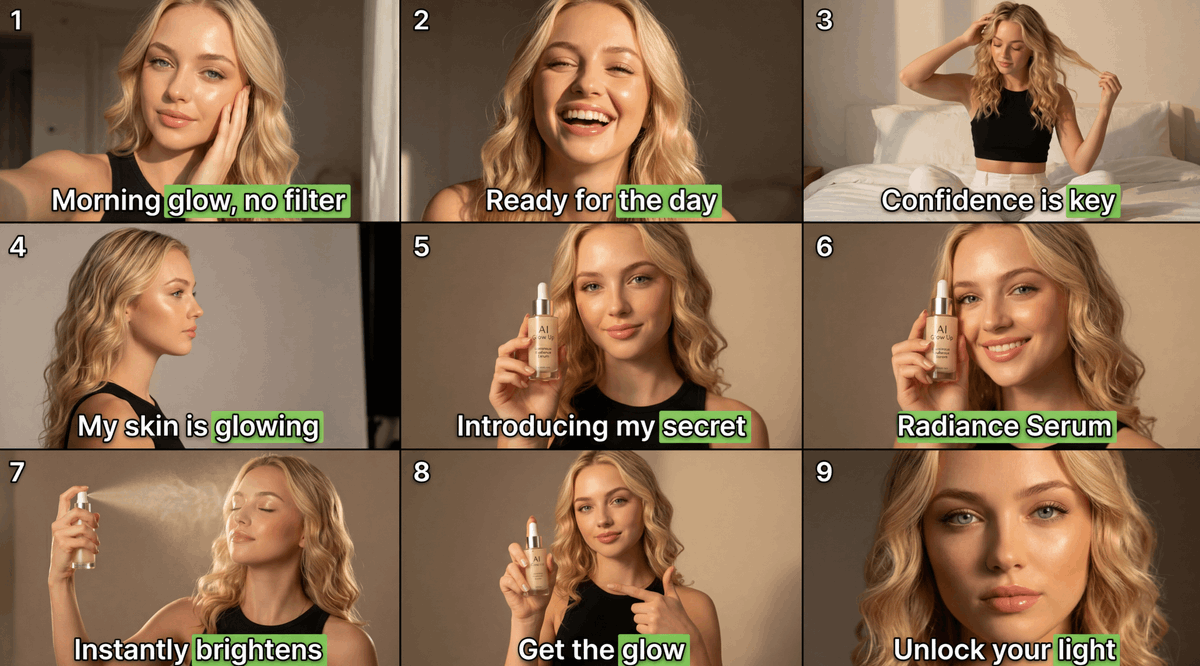
9-Panel Beauty Serum Storyboard
Creates a realistic influencer-style 3x3 skincare serum ad collage with numbered panels, captions, product shots, and anonymized facial rectangles.
This is a gpt-image-2 prompt case for Product & Commercial. Use the copy-ready prompt below to generate similar visuals, and review YouMind OpenLab awesome-gpt-image-2 attribution plus commercial-use rights before reuse.
Prompt
Copy-ready prompt
Objective: Create a 3x3 social media ad storyboard mosaic for a beauty serum, showcasing the same young blonde woman demonstrating the brightening serum application in a cozy bedroom/dressing table setting. Within each panel, the subject's face must be anonymized using a flat, skin-toned rectangle blur/mask, while retaining visibility of the hair, pose, clothing, and product. Canvas: Widescreen 16:9 composite image, 1200 x 675 style, divided into 9 equal panels by a thin black grid. Add a small white panel number with a black outline to the top left corner of each panel, numbered 1 through 9. Subject Details: A young woman with {argument name="hair color" default="Long wavy blonde hair"} Light-skinned woman wearing a black sleeveless crop top. Warm indoor natural light, beige walls, and soft white bedding as a backdrop for some panels. Beauty ad aesthetics, realistic photography, influencer UGC style, shallow depth of field, and golden lighting. Product details: A small glass dropper bottle with a minimalist skincare brand label displaying text similar to "AI Glow Up" and "Serum." The bottle contains a warm golden liquid and comes with a white dropper cap. The product should be clearly visible in panels 5, 6, and 8. Layout: Using 9 separate panels: 1. A close-up selfie of a woman in warm morning light, her face obscured by a skin-toned rectangle, with the text "Morning glow, no filter" at the bottom. 2. A centered close-up portrait in the same room, with her face obscured, and the text "Ready for the day" at the bottom. 3. A wider bedroom shot against white bedding, showing a woman confidently posing and touching her hair, her face obscured, with the text "Confidence is key" at the bottom. 4. Side view of hair and shoulders, beige wall background, face obscured, bottom text: "My skin is glowing". 5. Woman holding a serum bottle near her face, face obscured, bottom text: "Introducing my secret". 6. Closer product demonstration, woman holding the serum bottle close to her face, face obscured by a large rectangle, bottom text: "Radiance Serum". 7. Woman spraying a fine mist upwards/sideways under warm light, face obscured, bottom text: "Instantly brightens". 8. Woman holding a serum bottle and pointing at it with another hand, face obscured, bottom text: "Get the glow". 9. Close-up of long, wavy blonde hair and shoulders, most of the face obscured by a large skin-colored rectangle, bottom text: "Unlock your light". Text style: Each panel has bold white title text with a black outline/shadow, placed near the bottom. In each heading, highlight a key phrase with a bright green rounded rectangle: “glow, no filter” in panel 1, “the day” in panel 2, “key” in panel 3, “glowing” in panel 4, “secret” in panel 5, the entire phrase “Radiance Serum” or the word “Serum” in panel 6, “brightens” in panel 7, “glow” in panel 8, and “light” in panel 9. If customized, use it in panel 6.{argument name="product name" default="Radiance Serum"} Use this as the product/title name. Constraints: Maintain the authenticity and consistency of the puzzle, as if it comes from frames of the same viral video. Use 9 panels, 9 panel numbers, and 9 titles. Do not add any additional logos, watermarks, UI elements, or other text besides the titles and simple product labels.Prompt variables
Editable argument placeholders found in the prompt, with their default values.
Variable
hair color
Default
Long wavy blonde hair
Variable
product name
Default
Radiance Serum
Reuse and source notes
Use this prompt safely after previewing the case.
- 1.Copy the prompt or open it directly in Dovoo with the generation button.
- 2.Adjust variables, aspect ratio, and reference images for your own use case.
- 3.Before publishing or paid usage, verify source rights, attribution requirements, and brand or likeness risks.
Can I use this prompt commercially?
Commercial-use status is unknown. Review the original source, license, brand constraints, and legal requirements before paid usage.
Where does this case come from?
This case is imported from YouMind OpenLab awesome-gpt-image-2; keep attribution visible and check the source URL before reuse.