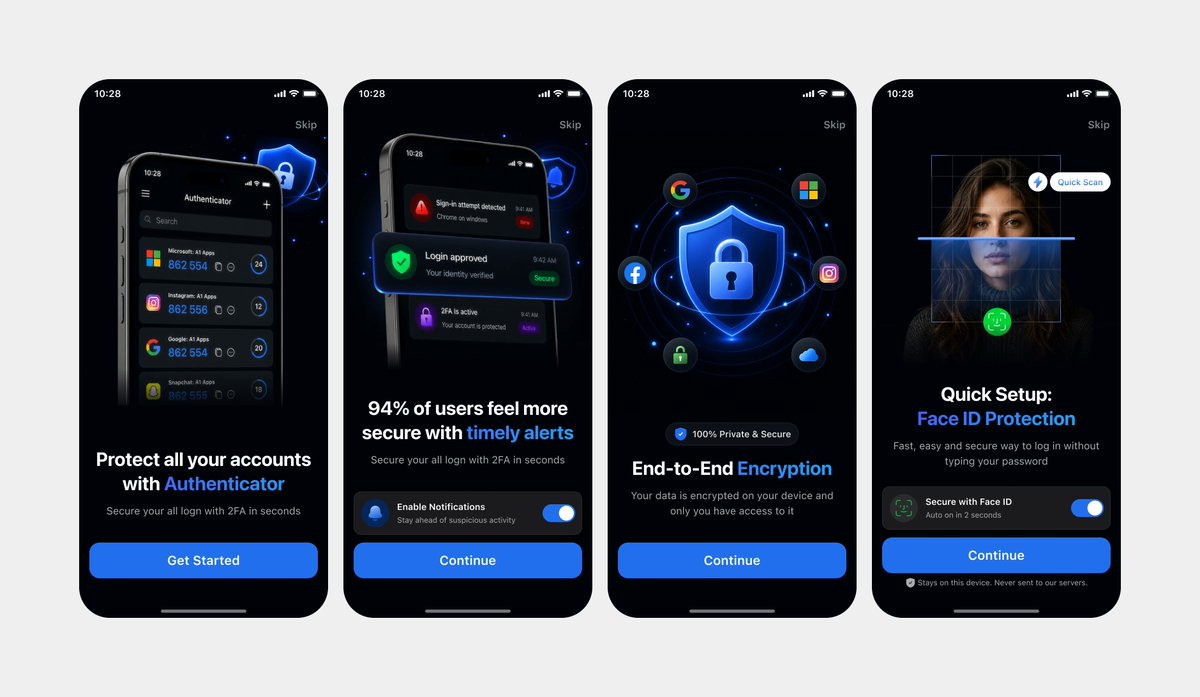
Clean Authenticator Onboarding UI Mockups
Generates a polished four-screen dark-mode mobile onboarding presentation from photographed UI references, useful for app landing pages or design showcases.
This is a gpt-image-2 prompt case for 产品商业. Use the copy-ready prompt below to generate similar visuals, and review YouMind OpenLab awesome-gpt-image-2 attribution plus commercial-use rights before reuse.

Prompt
Copy-ready prompt
Using REFERENCE_0 and REFERENCE_1 as design references, recreate the same four mobile onboarding screens as a clean, high-fidelity UI mockup, rather than a photograph of a laptop screen. Remove all perspective distortion, laptop/browser backgrounds, reflections, and camera artifacts. Place the four iPhone-style screens face up, evenly distributed across a light gray canvas, arranged in a row. Retain the dark mode version from REFERENCE_0, along with the same screen order, typographic hierarchy, blue security visual style, rounded phone borders, status bar, skip links, bottom home indicator, and CTA structure. Strictly retain the following four screens: 1) an authenticator account protection page with "Get Started," 2) a timely reminder page with a notification toggle and "Continue," 3) an end-to-end encryption page with a shield/lock icon, social icons, and "Continue," and 4) a Face ID quick setup page with a scan overlay, toggle, and "Continue." Ensure the UI is clear, refined, meets app store display standards, with sharp, legible text and consistent spacing.
More cases in this category
Prioritized by category, input mode compatibility, quality, and lower risk.

Premium Sports Editorial Poster
Text to Imageunknown

Hand-Drawn Sketch Photo Annotation
Text to Imageunknown

Vintage Film Projection Portrait
Image to Imageunknown

Cosmic Big Bang Snooze Comic
Text to Imageunknown

Hyper Realistic FIFA Football Poster
Text to Imageunknown

Direct Flash Editorial Portrait
Text to Imageunknown
Reuse and source notes
Use this prompt safely after previewing the case.
- 1.Copy the prompt or open it directly in Dovoo with the generation button.
- 2.Adjust variables, aspect ratio, and reference images for your own use case.
- 3.Before publishing or paid usage, verify source rights, attribution requirements, and brand or likeness risks.
Can I use this prompt commercially?
Commercial-use status is unknown. Review the original source, license, brand constraints, and legal requirements before paid usage.
Where does this case come from?
This case is imported from YouMind OpenLab awesome-gpt-image-2; keep attribution visible and check the source URL before reuse.