Apple in Eight Visual Grammars
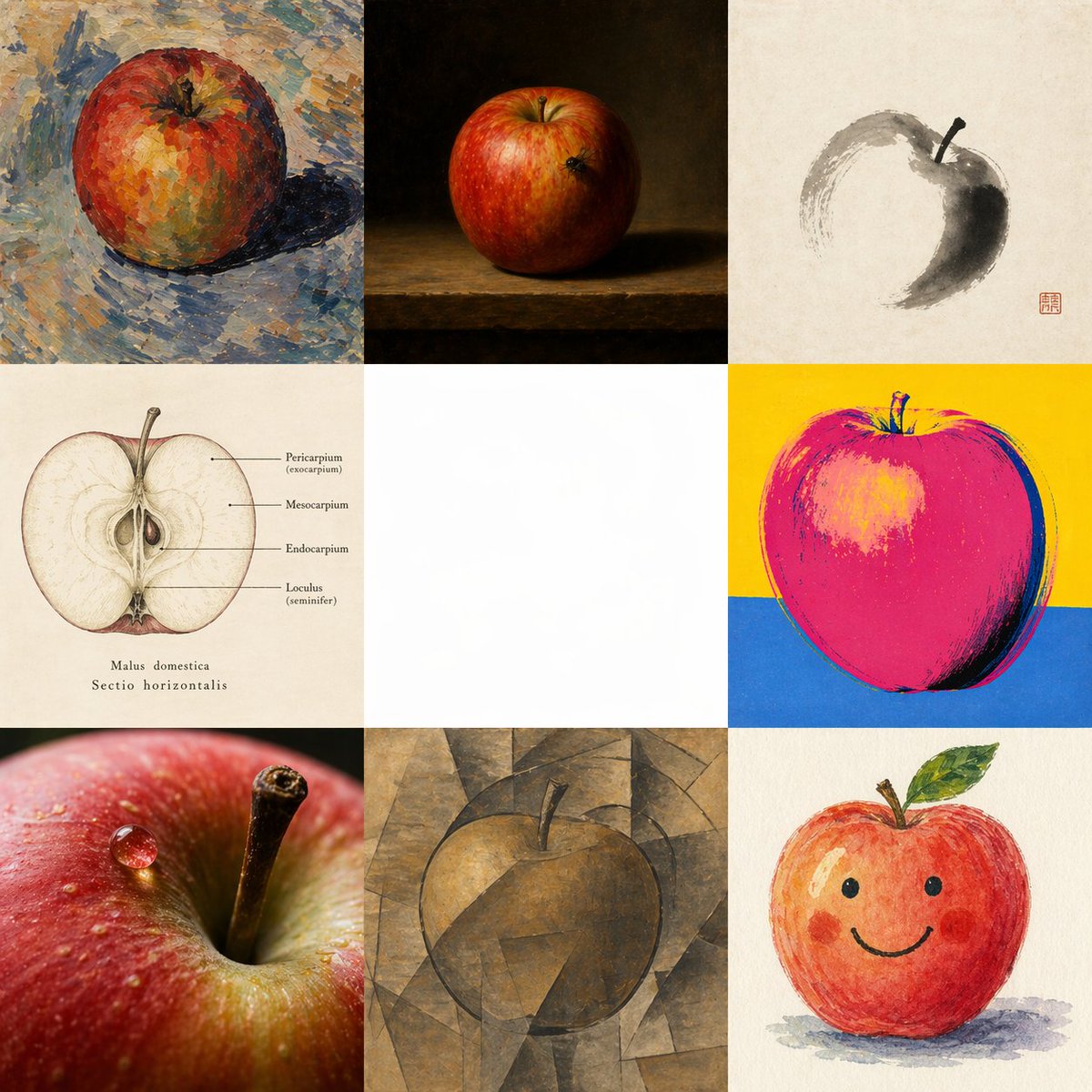
A square comparative art image showing one apple rendered in eight distinct styles around an intentionally blank center, ideal for demonstrating multi-style image generation in a single frame.
This is a gpt-image-2 prompt case for 插画艺术. Use the copy-ready prompt below to generate similar visuals, and review YouMind OpenLab awesome-gpt-image-2 attribution plus commercial-use rights before reuse.

Prompt
Copy-ready prompt
{
  "type": "Multi-style contrast art grid",
  "subject": "Interpreting a single apple through eight different visual systems in the same image",
  "composition": {
    "format": "3x3 square grid",
    "canvas": "Large square canvas",
    "background": "Except for the center cell, which is intentionally left blank, each cell uses its own appropriate background.",
    "center_cell": {
      "position": "Right in the middle",
      "content": "Blank white square negative space",
      "purpose": "As a clear visual gap separating different interpretations around it"
    },
    "cells": [
      {
        "position": "Top left",
        "style": "Post-Impressionist paintings in the style of Cézanne",
        "subject": "whole apple",
        "details": "A reddish-orange apple, rendered with heavy, broken brushstrokes and a palette knife texture, mottled warm and cool color blocks, a blue-gray tabletop or floor, and a distinct painted shadow on the right side, creating an expressive, thickly painted surface."
      },
      {
        "position": "Upper-middle",
        "style": "Dutch still life oil painting",
        "subject": "whole apple",
        "details": "A realistic red apple on a wooden shelf, against a dark brown-black background, uses dramatic chiaroscuro and subtle highlights on the fruit, creating a still life atmosphere reminiscent of a classic museum."
      },
      {
        "position": "Top right",
        "style": "ink painting",
        "subject": "An apple drawn with minimalist brushstrokes",
        "details": "Against a gray-white paper background, a few freehand gray-black ink strokes form an incomplete circular apple outline, with a dark shadow on one side, a simple stem, and a red stamp in the lower right corner of the cell, reflecting the elegance and restraint of East Asian calligraphy."
      },
      {
        "position": "Left and Middle",
        "style": "Medical Plant Atlas",
        "subject": "Apple horizontal cross section",
        "details": "Vintage scientific illustrations on old ivory paper feature a centered cross-section of an apple showing its seeds and internal structure, with fine lines pointing to different parts. Clear labels include \"Pericarpium (exocarpium),\" \"Mesocarpium,\" \"Endocarpium,\" and \"Loculus (seminifer),\" while below are notes \"Malus domestica\" and \"Sectio horizontalis.\""
      },
      {
        "position": "Right Center",
        "style": "Warhol-style pop art screen printing",
        "subject": "whole apple",
        "details": "The boldly simplified apple, rendered in saturated bright pink and magenta with a dark outline, contrasts against a bright yellow upper background and a cobalt blue lower background. The high-contrast graphic treatment gives it the texture of a screen-printed poster."
      },
      {
        "position": "Bottom left",
        "style": "Hyper-realistic macro photography",
        "subject": "Apple close-up",
        "details": "A macro photographic perspective of the apple peel and the indentation of the stem, with the stem clearly in focus, glistening water droplets on the red peel, shallow depth of field, a glossy texture, and realistic mirror-like highlights."
      },
      {
        "position": "Middle to lower",
        "style": "Cubist painting",
        "subject": "whole apple",
        "details": "The apple is deconstructed into angular geometric planes in soft brown, ochre, and gray hues, blending with the background to create a restrained analytical cubist atmosphere, with the stem visible at the top."
      },
      {
        "position": "Bottom right",
        "style": "Children's illustrations",
        "subject": "Cute smiling apple character",
        "details": "A friendly, hand-painted watercolor or crayon style apple with rosy cheeks, simple black dot eyes, a curved smile, a small stem and green leaves, and soft shadows below—a whimsical picture book style."
      }
    ],
    "count": 8
  },
  "lighting": "Each style uses its own consistent internal lighting logic.",
  "color_strategy": "Each cell uses a unique color palette to emphasize different presentation syntax.",
  "instructions": "Create a unified single image, rather than collaging individual files, to showcase {argument name=\"subject\" default=\"An apple\"} Presentation under 8 visual grammars surrounding central white space. Keep the center cell blank. Strictly maintain a 3x3 grid, containing 8 filled cells and 1 central blank cell. Make each filled cell a strong example of its style while keeping the core theme consistent.",
  "style_labels": [
    "{argument name=\"style 1\" default=\"Cézanne\"}",
    "{argument name=\"style 2\" default=\"Dutch Still Life\"}",
    "{argument name=\"style 3\" default=\"ink painting\"}",
    "{argument name=\"style 4\" default=\"Medical Atlas\"}",
    "{argument name=\"style 5\" default=\"Warhol\"}",
    "{argument name=\"style 6\" default=\"Hyper-realistic macro photography\"}",
    "{argument name=\"style 7\" default=\"Cubism\"}",
    "{argument name=\"style 8\" default=\"Children's illustrations\"}"
  ]
}
Prompt variables
Editable argument placeholders found in the prompt, with their default values.
More cases in this category
Prioritized by category, input mode compatibility, quality, and lower risk.






Reuse and source notes
Use this prompt safely after previewing the case.
- 1.Copy the prompt or open it directly in Dovoo with the generation button.
- 2.Adjust variables, aspect ratio, and reference images for your own use case.
- 3.Before publishing or paid usage, verify source rights, attribution requirements, and brand or likeness risks.
Can I use this prompt commercially?
Commercial-use status is unknown. Review the original source, license, brand constraints, and legal requirements before paid usage.
Where does this case come from?
This case is imported from YouMind OpenLab awesome-gpt-image-2; keep attribution visible and check the source URL before reuse.