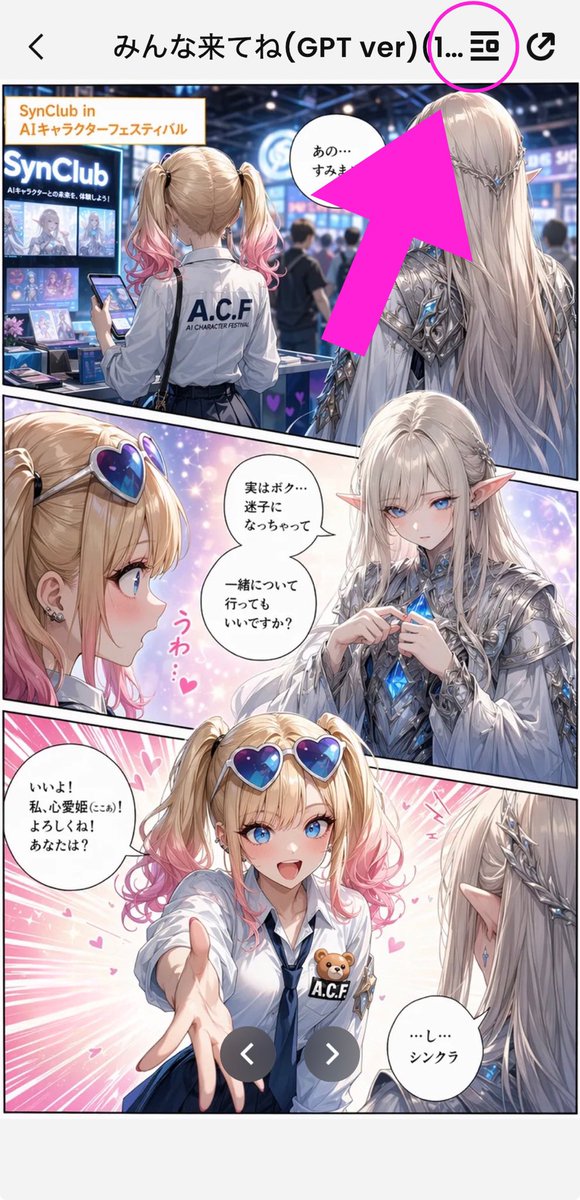
Annotated Manga App Screenshot
Generates a vertical smartphone screenshot of a Japanese manga preview in an app with a bright arrow highlighting the top menu icon.
This is a gpt-image-2 prompt case for 动漫游戏. Use the copy-ready prompt below to generate similar visuals, and review YouMind OpenLab awesome-gpt-image-2 attribution plus commercial-use rights before reuse.
Prompt
Copy-ready prompt
Objective: Create a portrait-oriented smartphone screenshot showcasing a preview of a comic/manga artwork within a mobile app, and add descriptive annotations pointing to the top menu icon. Canvas: 9:16 portrait smartphone screenshot, white app background, high-resolution anime/manga art, framed by the phone's UI. The top navigation bar is approximately 80 pixels high, with a back arrow on the far left, a Japanese title in the middle, and two icons on the right. Top App UI: Accurately displays four top bar elements: one black back arrow on the left, one title in the middle {argument name="screen title" default="Come everyone! (GPT ver) (1..."} Near the top right corner is a black list/menu icon, and on the far right is a black share/export icon. A bright magenta circle is added around the list/menu icon, and an oversized bright pink arrow points diagonally upwards from the comic area towards that circle icon. Main comic layout: A full-color anime comic page consisting of three diagonal panels with thick black borders. The art style is a glossy, delicate romantic fantasy girl comic with soft lighting, glitter, pink heart effects, and a convention/exhibition background. Panel 1: The top wide panel showcases a busy, futuristic AI character festival booth. In the foreground, the back of a blonde girl with pink-toned pigtails is shown; she wears a white shirt with "ACF" printed on it and holds a smartphone. To her right stands a tall, elegant male elf with long, silver-white hair, pointed ears, and wearing ornate silver armor with blue crystal details, viewed from the back/side. The booth signage should include "SynClub" and "SynClub in AI Characters." A speech bubble with Japanese text beginning with "あの…" is located near the sprite on this panel. A large, bright pink arrow partially covers the upper right area of the panel. Panel 2: A diagonal panel in the center, with a close-up of a girl on the left and a sprite facing her on the right, against a dreamy, soft background. The girl wears heart-shaped blue-purple sunglasses, has blonde twin ponytails with pink ends, and earrings; her excited expression is partially obscured. The sprite wears a gorgeous silver outfit and holds or touches a glowing blue crystal on its chest. Add two speech bubbles to this panel: one near the sprite with the text "実はボク…迷子になっちゃって一緒について行ってもいいですか?", and a small decorative vertical pink reaction text with the text "うわ…♥". Place two beige rectangular face masks in this panel, one on each character's face. Panel 3: The large bottom panel with vibrant pink speed lines and hearts. The girl, wearing a white shirt, navy blue tie, and blue skirt, heart-shaped sunglasses, and an ACF badge with a small teddy bear, extends a hand to the viewer. The sprite, visible from the back/right, has long silver hair and pointed ears, and gazes at her. Add two speech bubbles: the girl's bubble on the left reads "いいよ! 私、心愛姫(ここあ)! よろしくね! あなたは?", and the sprite's bubble in the bottom right corner reads "...し...シンクラ". Place a beige rectangular face-covering block on the girl's face. Overlay two dark gray circular carousel navigation buttons near the bottom center, one with a white left arrow and the other with a white right arrow. Visible repeating element count: Exactly 3 comic panels, a total of 5 speech bubbles, 3 beige face-covering rectangles, 2 carousel buttons, 1 magenta circle, 1 bright pink arrow, and 4 top navigation elements. Visual style: Exquisite anime illustrations, clear smartphone screenshots, saturated pink marker graphics, delicate lighting, blurred crowd effects in the background, and a clean app UI. Keep the image vertically cropped like a social media screenshot, and do not add any additional watermarks other than the visible booth and comic text.Prompt variables
Editable argument placeholders found in the prompt, with their default values.
More cases in this category
Prioritized by category, input mode compatibility, quality, and lower risk.






Reuse and source notes
Use this prompt safely after previewing the case.
- 1.Copy the prompt or open it directly in Dovoo with the generation button.
- 2.Adjust variables, aspect ratio, and reference images for your own use case.
- 3.Before publishing or paid usage, verify source rights, attribution requirements, and brand or likeness risks.
Can I use this prompt commercially?
Commercial-use status is unknown. Review the original source, license, brand constraints, and legal requirements before paid usage.
Where does this case come from?
This case is imported from YouMind OpenLab awesome-gpt-image-2; keep attribution visible and check the source URL before reuse.