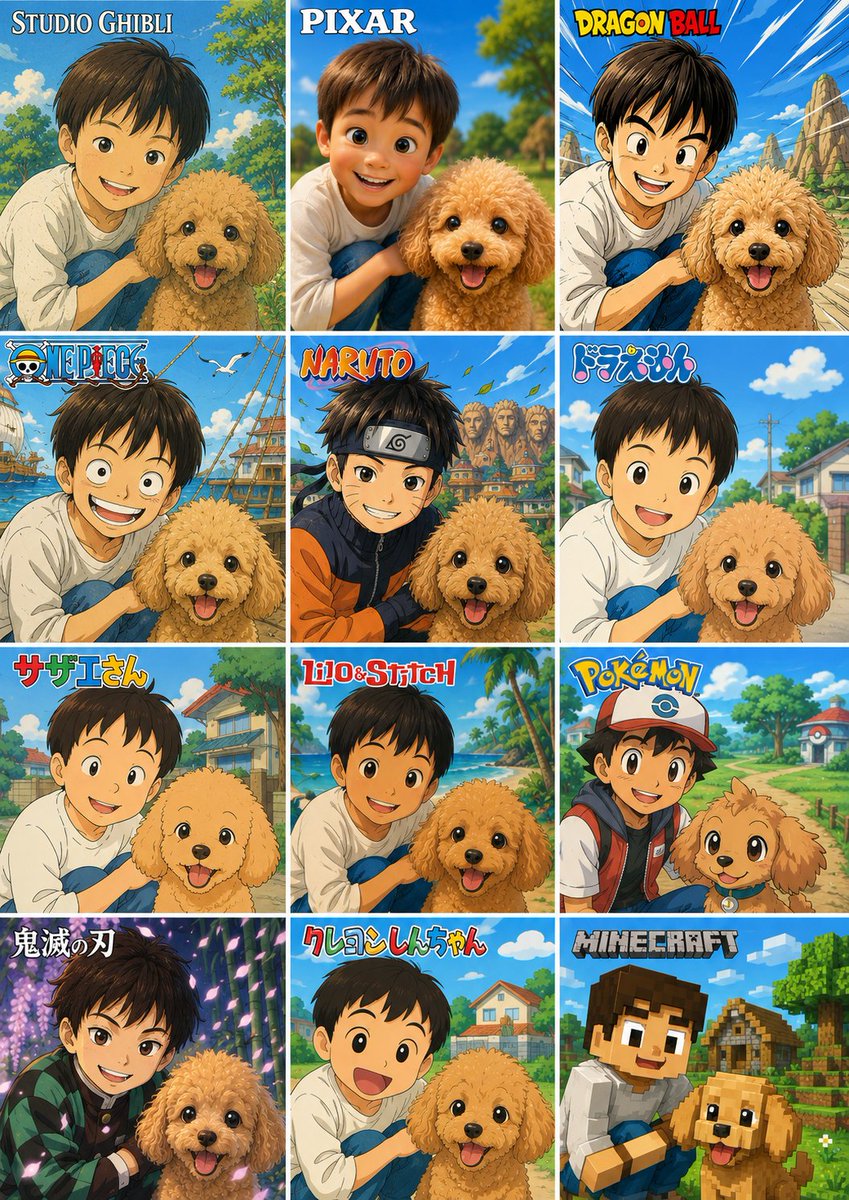
12-Style Anime Pet Collage
Creates a 12-panel comparison poster that turns a child-and-dog reference photo into multiple anime, cartoon, and game-inspired styles.
This is a gpt-image-2 prompt case for 平面海报. Use the copy-ready prompt below to generate similar visuals, and review YouMind OpenLab awesome-gpt-image-2 attribution plus commercial-use rights before reuse.

Prompt
Copy-ready prompt
Using the provided reference image as the main subject and compositional basis, create a 3-column, 4-row vertical contrast collage showcasing the same pair of children and dogs transformed into 12 different animated/game-like styles. Maintain the combination of children and dogs, their intimate poses, the cheerful outdoor atmosphere, and the color blocks obscuring their faces from the original image, but redraw each square with a unique brand-style cartoon/anime aesthetic, complete with appropriate backgrounds, and add a title logo to the top of each square. Canvas and Layout: Create a poster-style image containing 12 equally sized rectangular panels separated by thin white grid lines, arranged in 3 columns × 4 rows. Each panel should have the main subject cropped in a similar manner to the reference image, but the scene should be adjusted according to the chosen style. The panels should be ordered from top left to bottom right and must contain the following 12 visible title labels: 1.{argument name="style label 1" default="Studio Ghibli"} — A soft, hand-drawn fantasy countryside style. 2.{argument name="style label 2" default="Pixar"} — A glossy, 3D animated home movie style. 3.{argument name="style label 3" default="Dragon Ball"} — A hardcore action comic book style filled with dramatic skies and rocky landscapes. 4.{argument name="style label 4" default="One Piece"} — A pirate adventure anime style featuring ships, the ocean, and seabirds. 5.{argument name="style label 5" default="Naruto"} — Ninja anime style with village rooftops and vibrant colors. 6. Doraemon — Bright and simple children's anime suburban style. 7. Sazae-san — Classic Japanese family anime community style. 8. Lilo & Stitch — Tropical island cartoon style with palm trees and beach colors. 9. Pokémon — Brightly colored adventure anime style with hat/backpack designs and characters traversing game-like town paths. 10. Demon Slayer — Dramatic dark fantasy anime style with glowing purple forest lighting. 11. Creyon-chan — Simple, rounded, and humorous anime style with children's cheerful, open-mouthed expressions. 12. Minecraft — Blocky voxel game style with blocky characters, village houses, and pixelated terrain. Style Guidelines: Titles should mimic the recognizable logo treatment for each style while remaining clear and legible. Retain the dog's happy expression and the fluffy toy poodle silhouette in all panels, adjusting only the rendering style. Do not add additional panels, labels, watermarks, descriptive text, or irrelevant characters.Prompt variables
Editable argument placeholders found in the prompt, with their default values.
More cases in this category
Prioritized by category, input mode compatibility, quality, and lower risk.






Reuse and source notes
Use this prompt safely after previewing the case.
- 1.Copy the prompt or open it directly in Dovoo with the generation button.
- 2.Adjust variables, aspect ratio, and reference images for your own use case.
- 3.Before publishing or paid usage, verify source rights, attribution requirements, and brand or likeness risks.
Can I use this prompt commercially?
Commercial-use status is unknown. Review the original source, license, brand constraints, and legal requirements before paid usage.
Where does this case come from?
This case is imported from YouMind OpenLab awesome-gpt-image-2; keep attribution visible and check the source URL before reuse.