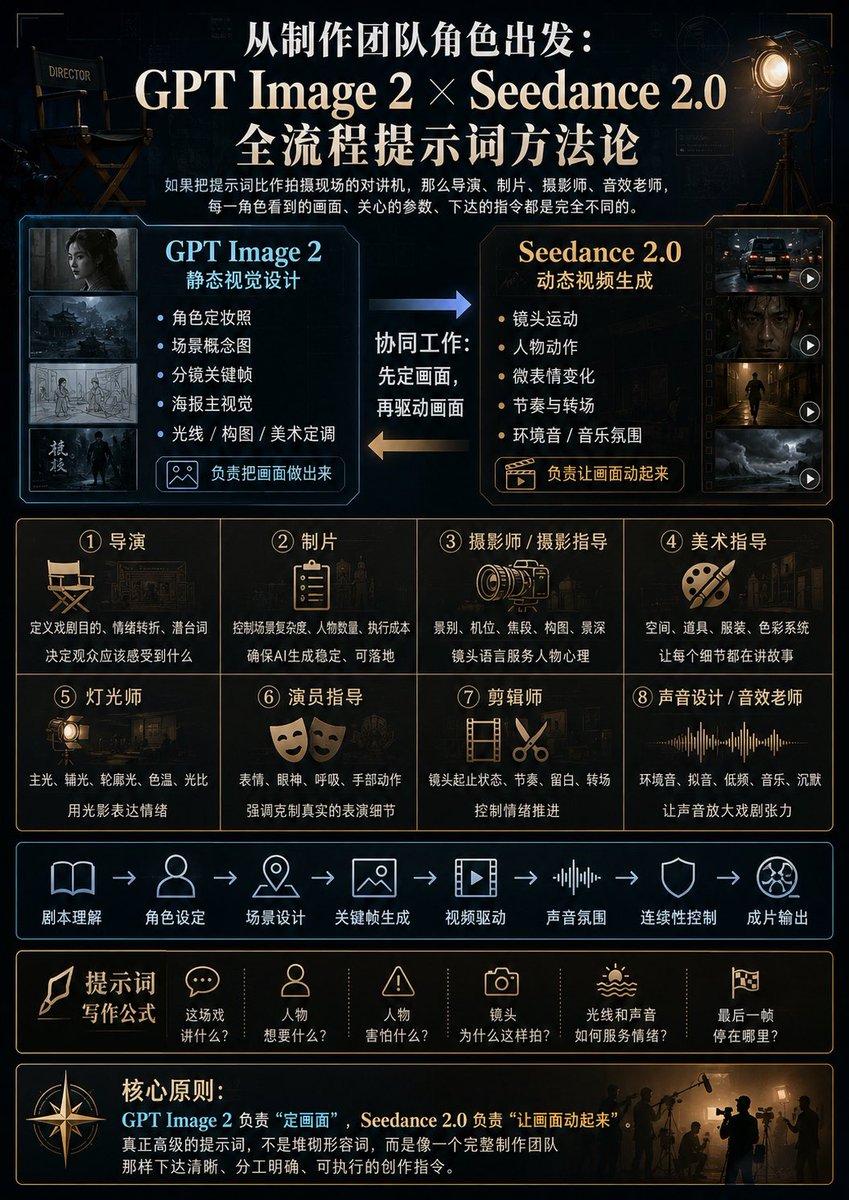
AI Filmmaking Prompt Workflow Infographic
A premium Chinese cinematic infographic explaining how GPT Image 2 and Seedance 2.0 work together through production-team roles and prompt-writing steps.
This is a gpt-image-2 prompt case for Graphic & Poster. Use the copy-ready prompt below to generate similar visuals, and review YouMind OpenLab awesome-gpt-image-2 attribution plus commercial-use rights before reuse.
Prompt
Copy-ready prompt
{
  "type": "A cinematic Chinese infographic poster showcasing an AI-powered filmmaking workflow with prompts.",
  "format": "Vertical 3:4 poster",
  "overall_style": "The design evokes a sophisticated, high-end film production control room aesthetic, featuring a black and deep navy blue background, meticulously crafted blueprint grids and technical HUD lines, accented with warm gold and cool cyan, high contrast, refined typography, a combination of realistic film props and clean vector icons, and elegant Chinese fonts.",
  "headline": {
    "position": "Centered at the top",
    "text": "{argument name=\"main headline\" default=\"From the perspective of the production team:\\nGPT Image 2 × Seedance 2.0\\nFull-flow prompting methodology\"}",
    "style": "Large, bold white serif Chinese font with gold emphasis, centered."
  },
  "subtitle": {
    "position": "Below the title",
    "text": "If we compare the prompts to walkie-talkies on set, then the director, producer, cinematographer, and sound engineer—each role—sees completely different visuals, focuses on different parameters, and issues completely different instructions.",
    "style": "Small white Chinese description text"
  },
  "top_props": {
    "count": 2,
    "items": [
      {
        "description": "The director's chair is located in the upper left corner and is labeled \"DIRECTOR.\" The lighting is dim."
      },
      {
        "description": "The vintage movie spotlight on the tripod in the upper right corner emits a warm amber glow."
      }
    ]
  },
  "main_comparison": {
    "position": "Upper Mid-to-Upper",
    "count": 2,
    "panels": [
      {
        "title": "GPT Image 2",
        "subtitle": "Static visual design",
        "position": "left",
        "accent_color": "Cyan",
        "thumbnail_count": 4,
        "thumbnails": [
          "Dark-themed character portraits",
          "A cinematic urban or battlefield environment in a storm",
          "Storyboard sketch",
          "Cinematic poster main visual featuring standing figures"
        ],
        "bullet_count": 5,
        "bullets": [
          "Character costume photos",
          "Scene concept art",
          "Storyboard Keyframes",
          "Poster main visual",
          "Lighting / Composition / Artistic Tone"
        ],
        "button_label": "Responsible for creating the visuals",
        "button_icon": "Image icon"
      },
      {
        "title": "Seedance 2.0",
        "subtitle": "Dynamic video generation",
        "position": "right",
        "accent_color": "warm gold",
        "thumbnail_count": 4,
        "thumbnails": [
          "Nighttime car chase or vehicle footage, with play icon",
          "Dark close-up video frames with play icon",
          "Characters walk through a cinematic corridor with a play icon.",
          "Storm landscape dynamic footage, with play icon"
        ],
        "bullet_count": 5,
        "bullets": [
          "Camera movement",
          "Character Actions",
          "Micro-expression changes",
          "Rhythm and Transitions",
          "Ambient sound/musical atmosphere"
        ],
        "button_label": "Responsible for making the picture move",
        "button_icon": "Clapperboard play icon"
      }
    ]
  },
  "workflow_arrows": {
    "position": "Comparison between panels",
    "count": 2,
    "labels": [
      "Collaborative work: Define the frame first, then drive the frame.",
      "Blue arrows from left to right",
      "Gold arrows from right to left"
    ]
  },
  "production_team_grid": {
    "position": "Central",
    "count": 8,
    "layout": "2 rows and 4 columns",
    "cells": [
      {
        "number": "1",
        "title": "director",
        "icon": "Director's Chair",
        "text": "Define the purpose, emotional shifts, and subtext of the play; determine what the audience should feel."
      },
      {
        "number": "2",
        "title": "Producer",
        "icon": "Clipboard",
        "text": "Control scene complexity, number of characters, and execution costs; ensure stable AI generation and practical applicability."
      },
      {
        "number": "3",
        "title": "Photographer/Director of Photography",
        "icon": "Movie camera lens",
        "text": "Shot size, camera position, focal length, composition, depth of field; cinematic language serves the psychology of the subject."
      },
      {
        "number": "4",
        "title": "Art Director",
        "icon": "Palette and brushes",
        "text": "Space, props, costumes, color scheme; making every detail tell a story."
      },
      {
        "number": "5",
        "title": "Lighting technician",
        "icon": "Studio lighting",
        "text": "Key light, fill light, rim light, color temperature, light ratio; using light and shadow to express emotions."
      },
      {
        "number": "6",
        "title": "Actors' guidance",
        "icon": "theatrical masks",
        "text": "Facial expressions, eye contact, breathing, hand gestures; emphasizing restrained yet realistic performance details."
      },
      {
        "number": "7",
        "title": "Editor",
        "icon": "Film and Scissors",
        "text": "The beginning and end of shots, rhythm, pauses, transitions; controlling the progression of emotions."
      },
      {
        "number": "8",
        "title": "Sound designer/sound effects teacher",
        "icon": "audio waveform",
        "text": "Ambient sounds, sound effects, low frequencies, music, silence; amplifying the dramatic tension of sound."
      }
    ]
  },
  "pipeline_strip": {
    "position": "Mid-lower part",
    "count": 8,
    "style": "The cyan line icons are connected by arrows.",
    "steps": [
      "Script Understanding",
      "Character settings",
      "Scene design",
      "Keyframe generation",
      "Video driver",
      "Sound Atmosphere",
      "Continuous control",
      "Full-length output"
    ]
  },
  "prompt_formula_bar": {
    "position": "Below the assembly line",
    "title": "Prompt word writing formula",
    "count": 6,
    "items": [
      {
        "icon": "speech bubbles",
        "label": "What is this scene about?"
      },
      {
        "icon": "figure",
        "label": "What do the characters want?"
      },
      {
        "icon": "Warning triangle",
        "label": "What are the characters afraid of?"
      },
      {
        "icon": "camera",
        "label": "Why shoot it this way?"
      },
      {
        "icon": "Sun and sound waves",
        "label": "How do light and sound serve emotions?"
      },
      {
        "icon": "Movie Flag",
        "label": "Where does the last frame stop?"
      }
    ]
  },
  "core_principle_footer": {
    "position": "bottom",
    "title": "Core principles:",
    "text": "{argument name=\"core principle text\" default=\"GPT Image 2 is responsible for "defining the image," while Seedance 2.0 is responsible for "making the image move." Truly advanced prompts are not about piling up adjectives, but about issuing clear, well-defined, and executable creative instructions, just like a complete production team.\"}",
    "decorations": "A large compass icon on the left, silhouettes of a film crew and sound engineer on the right, with warm backlighting."
  },
  "color_palette": {
    "background": "Near black navy blue",
    "primary_text": "Ivory White",
    "accent_1": "Cyan",
    "accent_2": "Golden amber",
    "lines": "Slender gold and cyan border"
  },
  "composition_notes": "The design panel features numerous precise rectangular modules with slender, glowing borders, balanced spacing, movie poster-style hierarchy, clear Chinese text, high-end tutorial infographics for creators, and a clean layout free of clutter.",
  "customization": {
    "topic": "{argument name=\"topic\" default=\"AI-powered cinematic prompting methodology\"}",
    "left tool name": "{argument name=\"left tool name\" default=\"GPT Image 2\"}",
    "right tool name": "{argument name=\"right tool name\" default=\"Seedance 2.0\"}"
  }
}
Prompt variables
Editable argument placeholders found in the prompt, with their default values.
Variable
main headline
Default
From the perspective of the production team: GPT Image 2 × Seedance 2.0 Full-Process Hint Methodology
Variable
core principle text
Default
GPT Image 2 is responsible for "defining the image," while Seedance 2.0 is responsible for "making the image move." Truly advanced prompts are not about piling up adjectives, but about issuing clear, well-defined, and executable creative instructions, just like a complete production team.
Variable
topic
Default
AI-powered cinematic prompting methodology
Variable
left tool name
Default
GPT Image 2
Variable
right tool name
Default
Seedance 2.0
Reuse and source notes
Use this prompt safely after previewing the case.
- 1.Copy the prompt or open it directly in Dovoo with the generation button.
- 2.Adjust variables, aspect ratio, and reference images for your own use case.
- 3.Before publishing or paid usage, verify source rights, attribution requirements, and brand or likeness risks.
Can I use this prompt commercially?
Commercial-use status is unknown. Review the original source, license, brand constraints, and legal requirements before paid usage.
Where does this case come from?
This case is imported from YouMind OpenLab awesome-gpt-image-2; keep attribution visible and check the source URL before reuse.