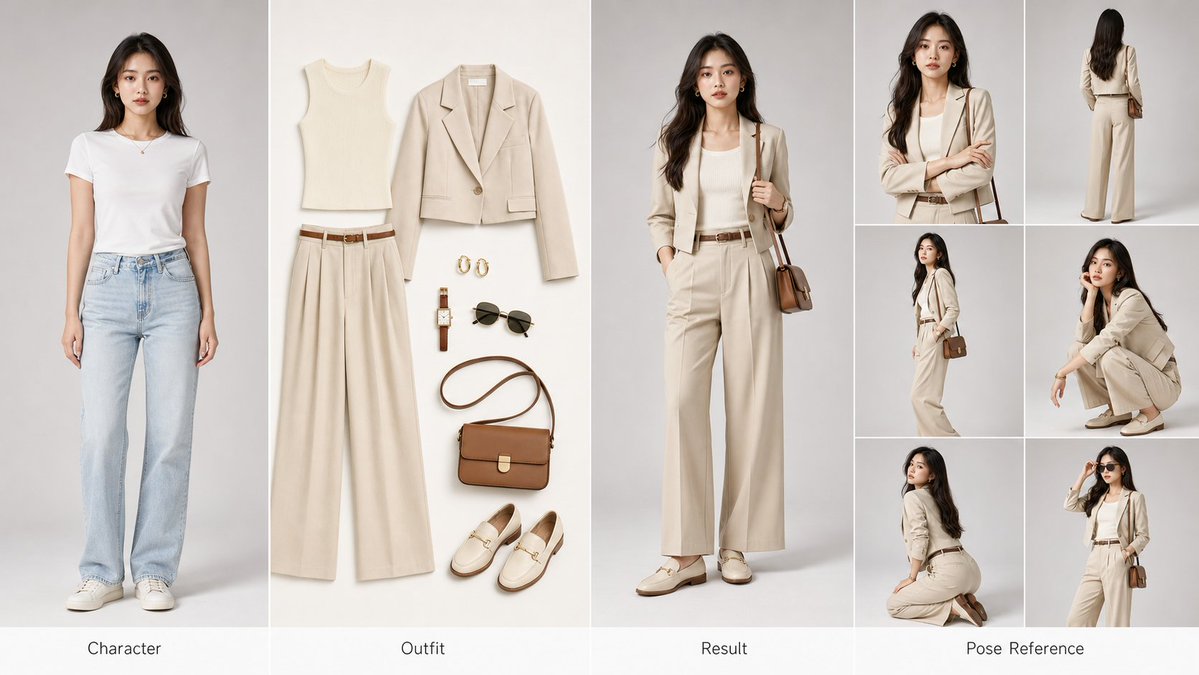
AI Fashion Comparison Poster
A comprehensive prompt for creating a professional four-panel fashion poster suitable for AI training and commercial display.
This is a gpt-image-2 prompt case for Fashion & Beauty. Use the copy-ready prompt below to generate similar visuals, and review YouMind OpenLab awesome-gpt-image-2 attribution plus commercial-use rights before reuse.

Prompt
Copy-ready prompt
Create a horizontal{argument name="aspect ratio" default="16:9"}{argument name="layout" default="four-panel"} A fashion try-on reference poster suitable for AI training and commercial presentations. 📐 Layout (from left to right): ① Left Grid – Character (Prototype): Original character portrait, standard frontal pose, clear facial features, natural hair and skin tone, clean light gray studio background, professional portrait lighting. ② Middle Grid – Clothing (Flat Lap): Exquisite flat lay display of the complete clothing set: top/jacket/pants or skirt/shoes/bag/accessories, seamless white or beige background, commercial-grade product lighting. ③ Right Grid – Effect (Finished Product): The same character wearing the new clothing, perfectly matching the original character's features, natural fit and fabric drape, with lighting consistent with the left grid. ④ Far Right Grid – Pose Reference: An arrangement of six small images showcasing different angles: front close-up, standing back, 45-degree side view, squatting, kneeling, and signature poses. 🎨 Visual Specifications: 4K Ultra HD image quality, a clean, independent studio background, a unified color tone, and professional three-point studio lighting.{argument name="aesthetic style" default="high-end fashion editorial"} The style is similar to Vogue/Elle, with realistic fabric textures and reflections, and elegant English labels below each section. 🎯 Core requirements: Facial consistency ≥ 95% | Natural-looking clothing | Consistent visual style | Commercially usable images.Prompt variables
Editable argument placeholders found in the prompt, with their default values.
Variable
aspect ratio
Default
16:9
Variable
layout
Default
four-panel
Variable
aesthetic style
Default
high-end fashion editorial
Reuse and source notes
Use this prompt safely after previewing the case.
- 1.Copy the prompt or open it directly in Dovoo with the generation button.
- 2.Adjust variables, aspect ratio, and reference images for your own use case.
- 3.Before publishing or paid usage, verify source rights, attribution requirements, and brand or likeness risks.
Can I use this prompt commercially?
Commercial-use status is unknown. Review the original source, license, brand constraints, and legal requirements before paid usage.
Where does this case come from?
This case is imported from YouMind OpenLab awesome-gpt-image-2; keep attribution visible and check the source URL before reuse.