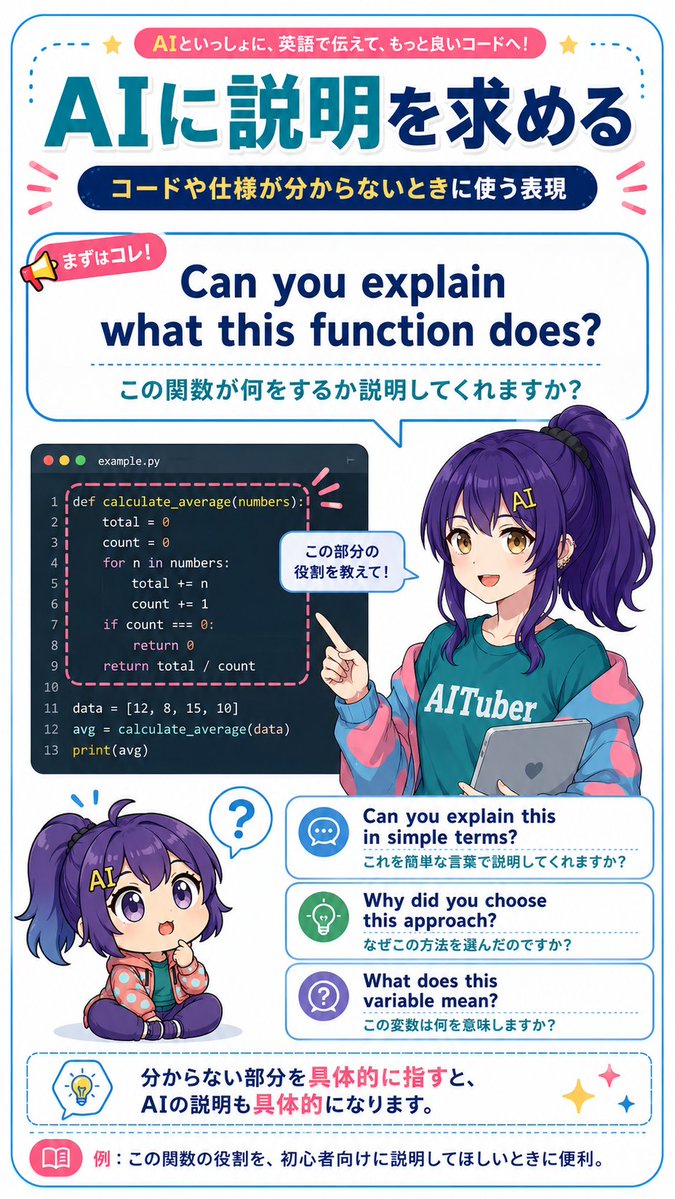
AI Code Explanation English Poster
Generates a vertical Japanese anime-style study poster teaching practical English phrases for asking an AI to explain code.
This is a gpt-image-2 prompt case for 平面海报. Use the copy-ready prompt below to generate similar visuals, and review YouMind OpenLab awesome-gpt-image-2 attribution plus commercial-use rights before reuse.
Prompt
Copy-ready prompt
{
  "type": "Vertical Japanese-style educational infographic poster for learning English as an AI programming assistant.",
  "style": "Bright and clean anime magazine layout, GPT-Image-2 style, combining clear vector typography with exquisite anime illustrations, white background, rounded blue borders, cyan and dark blue gradient, pink decorative ribbons, dotted dividing lines, cute icons, high-resolution printable learning materials.",
  "canvas": {
    "orientation": "portrait",
    "aspect_ratio": "9:16",
    "background": "White background with a thin, rounded cyan border and small decorative stars and emphasis symbols."
  },
  "theme": {
    "headline_context": "Fictional practical English learning material about asking AI for code and specification explanations.",
    "main_topic": "{argument name=\"main topic\" default=\"Seeking explanations from AI\"}",
    "top_badge_text": "{argument name=\"top badge text\" default=\"Work with AI, communicate in English, and write better code!\"}",
    "subtitle_text": "{argument name=\"subtitle text\" default=\"Expressions used when you don't understand the code or specifications\"}"
  },
  "layout": {
    "sections": [
      {
        "title": "Top title",
        "position": "top",
        "count": 3,
        "elements": [
          "Pink rounded banner with logo text at the top",
          "The title of the Japanese article \"Huge blue gradually turns to deep blue\" is: Asking AI for an explanation.",
          "Dark blue capsule-shaped subtitle with yellow Japanese text"
        ]
      },
      {
        "title": "Core phrase dialog box",
        "position": "upper middle",
        "count": 3,
        "elements": [
          "A small megaphone label that reads \"First of all, this one!\"",
          "A long English phrase: Can you explain what this function does?",
          "Can you explain what this function does?"
        ],
        "panel_style": "Large, rounded rectangular speech bubbles with cyan outlines, pointing in the direction of the character."
      },
      {
        "title": "Code Sample Panel",
        "position": "middle left",
        "count": 1,
        "elements": [
          "A dark code editor window, labeled example.py, features three macOS-style dots and contains the Python code: `def calculate_average(numbers):, total=0, count=0, loop through numbers, return total/count, data list, avg calculation, print(avg);` The function block is highlighted by a pink dashed rounded rectangle."
        ]
      },
      {
        "title": "Anime teacher character",
        "position": "middle right",
        "count": 1,
        "elements": [
          "The female anime AI-tuber teacher has long, high purple side ponytails, wears a light blue T-shirt with the words \"AITuber\" printed on it, an oversized blue and pink jacket, and holds a gray tablet computer with a heart-shaped icon, pointing to the code panel.",
          "The small conversation bubbles on the hand write: Tell me the role of this part!"
        ],
        "character": {
          "name": "{argument name=\"character name\" default=\"Nike-chan\"}",
          "hair_color": "{argument name=\"hair color\" default=\"Dark purple\"}",
          "outfit": "Cyan AITuber T-shirt, pastel cyberpunk jacket, a casual and friendly educator image."
        }
      },
      {
        "title": "Q-version reaction character",
        "position": "lower left",
        "count": 1,
        "elements": [
          "A chibi-style seated image of the same purple-haired character, with a confused expression and a question mark speech bubble above their head."
        ]
      },
      {
        "title": "Advanced phrase cards",
        "position": "lower middle right",
        "count": 3,
        "labels": [
          "Can you explain this in simple terms?",
          "Why did you choose this approach?",
          "What does this variable mean?"
        ],
        "card_style": "Three stacked white cards with rounded corners, featuring blue outlines, dotted line separators, and circular icons: a chat bubble, a light bulb, and a question mark."
      },
      {
        "title": "Bottom suggestion box",
        "position": "bottom",
        "count": 2,
        "elements": [
          "With the dotted line blue suggestion box, and the Japanese sentence: If you specifically point out the parts you don't understand, the AI's explanation will also become more specific.",
          "Example bar at the bottom with a pink book icon and text: Example: This is very useful when you want AI to explain the function to beginners."
        ]
      }
    ],
    "composition": "The educational posters are densely packed with content yet easy to read; the layout is clearly hierarchical, using centered English example phrases as the main learning points; the characters, code panels, and phrase cards slightly overlap to create a sense of space."
  },
  "rendering_notes": "Using accurate Japanese fonts, a clean sans-serif font, bold rounded corners, a vibrant cyan/dark blue/pink color palette, a cute classroom tech vibe, no photorealistic feel, no extra irrelevant text, and strictly preserving all listed visible text."
}
Prompt variables
Editable argument placeholders found in the prompt, with their default values.
More cases in this category
Prioritized by category, input mode compatibility, quality, and lower risk.






Reuse and source notes
Use this prompt safely after previewing the case.
- 1.Copy the prompt or open it directly in Dovoo with the generation button.
- 2.Adjust variables, aspect ratio, and reference images for your own use case.
- 3.Before publishing or paid usage, verify source rights, attribution requirements, and brand or likeness risks.
Can I use this prompt commercially?
Commercial-use status is unknown. Review the original source, license, brand constraints, and legal requirements before paid usage.
Where does this case come from?
This case is imported from YouMind OpenLab awesome-gpt-image-2; keep attribution visible and check the source URL before reuse.