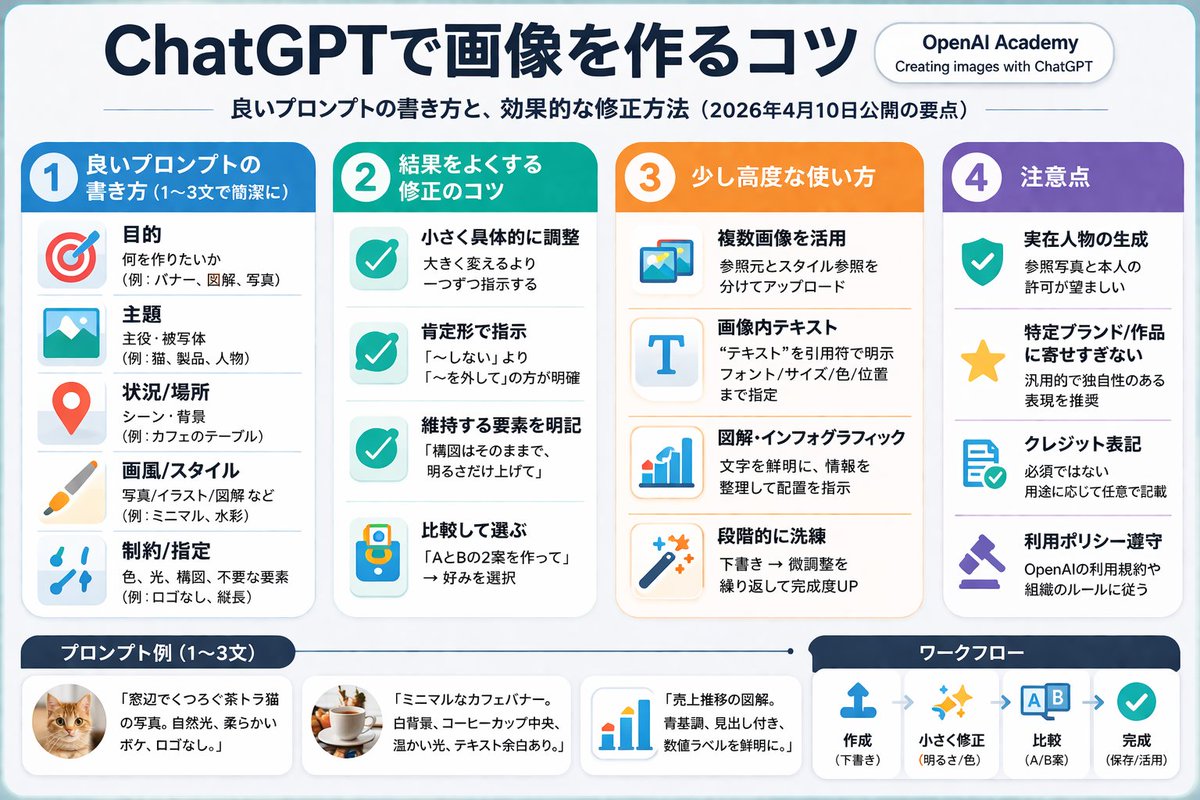
4-Column AI Image Generation Infographic
Generates a structured, 4-column infographic with a header, bulleted lists with icons, and a footer containing examples and a workflow diagram.
This is a gpt-image-2 prompt case for 平面海报. Use the copy-ready prompt below to generate similar visuals, and review YouMind OpenLab awesome-gpt-image-2 attribution plus commercial-use rights before reuse.
This prompt is designed for multiple reference images. We will open Dovoo with the prompt and the available preview image; add the remaining references in Dovoo before generating.

Prompt
Copy-ready prompt
{
  "type": "Infographic Quick Reference",
  "style": "Simple, modern, flat design, corporate style, Japanese text",
  "header": {
    "main_title": "{argument name=\"main title\" default=\"ChatGPT Image Generation Techniques\"}",
    "subtitle": "{argument name=\"subtitle\" default=\"High-quality prompt word writing techniques and efficient revision methods (Key points to be released on April 10, 2026)\"}",
    "badge": "OpenAI Academy / Creating Images Using ChatGPT"
  },
  "layout": {
    "main_grid": {
      "columns": 4,
      "sections": [
        {
          "column": 1,
          "color_theme": "blue",
          "header": "1 {argument name=\"column 1 title\" default=\"High-quality prompt words (1-3 concise sentences)\"}",
          "item_count": 5,
          "labels": [
            "Purpose",
            "theme",
            "Scene/Location",
            "Art style/art",
            "Constraints/Specifications"
          ]
        },
        {
          "column": 2,
          "color_theme": "teal green",
          "header": "2 {argument name=\"column 2 title\" default=\"Optimization techniques for correcting results\"}",
          "item_count": 4,
          "labels": [
            "Fine-tuning specific details",
            "Use affirmative sentence instructions",
            "Clearly define the elements that need to be retained.",
            "Comparison and selection"
          ]
        },
        {
          "column": 3,
          "color_theme": "orange",
          "header": "3. Advanced Usage",
          "item_count": 4,
          "labels": [
            "Using multiple images",
            "Text within image",
            "Infographics",
            "Step-by-step refinement"
          ]
        },
        {
          "column": 4,
          "color_theme": "purple",
          "header": "4. Precautions",
          "item_count": 4,
          "labels": [
            "Realistic character generation",
            "Avoid excessive imitation of specific brands/works",
            "Signature",
            "Comply with usage policies"
          ]
        }
      ]
    },
    "bottom_section": {
      "left_panel": {
        "title": "{argument name=\"examples title\" default=\"Example prompts (1-3 sentences)\"}",
        "item_count": 3,
        "thumbnails": [
          "Orange cat",
          "coffee cup on the table",
          "Blue bar chart"
        ]
      },
      "right_panel": {
        "title": "Workflow",
        "step_count": 4,
        "labels": [
          "create",
          "Fine-tuning",
          "contrast",
          "Finish"
        ]
      }
    }
  }
}
Prompt variables
Editable argument placeholders found in the prompt, with their default values.
More cases in this category
Prioritized by category, input mode compatibility, quality, and lower risk.






Reuse and source notes
Use this prompt safely after previewing the case.
- 1.Copy the prompt or open it directly in Dovoo with the generation button.
- 2.Adjust variables, aspect ratio, and reference images for your own use case.
- 3.Before publishing or paid usage, verify source rights, attribution requirements, and brand or likeness risks.
Can I use this prompt commercially?
Commercial-use status is unknown. Review the original source, license, brand constraints, and legal requirements before paid usage.
Where does this case come from?
This case is imported from YouMind OpenLab awesome-gpt-image-2; keep attribution visible and check the source URL before reuse.