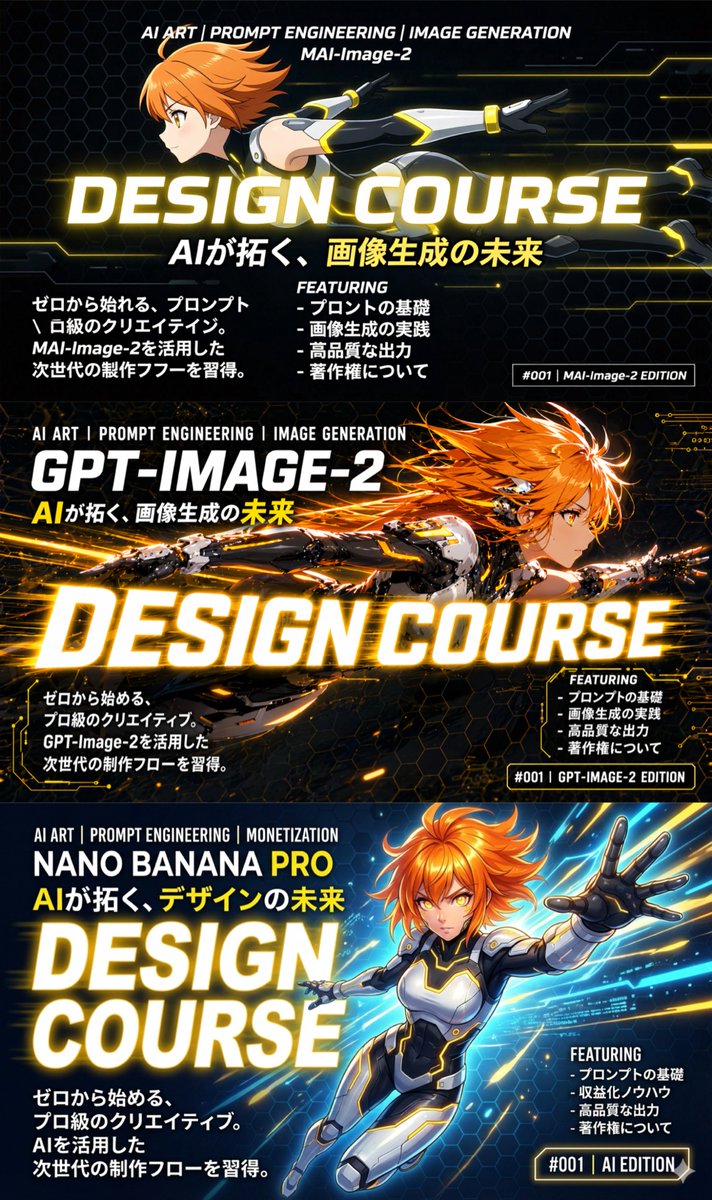
3-Panel Anime Sci-Fi Course Promo
Generates a three-panel vertical infographic comparing different AI models, featuring an anime character in dynamic poses and detailed typography.
This is a gpt-image-2 prompt case for 平面海报. Use the copy-ready prompt below to generate similar visuals, and review YouMind OpenLab awesome-gpt-image-2 attribution plus commercial-use rights before reuse.
Prompt
Copy-ready prompt
{
  "type": "3 vertical promotional information charts",
  "theme": "Sci-fi anime characters showcasing different AI models",
  "global_elements": {
    "character_base": {
      "gender": "woman",
      "hair": "{argument name=\"character hair color\" default=\"orange color\"}",
      "attire": "Futuristic Sci-Fi Bodysuit"
    },
    "main_typography": "{argument name=\"main title\" default=\"Design Courses\"}",
    "subtitle_typography": "{argument name=\"japanese subtitle\" default=\"AI opens up the future of image generation.\"}"
  },
  "layout": {
    "structure": "3 stacked horizontal panels",
    "panels": [
      {
        "position": "top",
        "model_name": "{argument name=\"top model name\" default=\"MAI-Image-2\"}",
        "art_style": "Flat anime-style shadows, clean lines, minimalist sci-fi background.",
        "character_pose": "fly horizontally to the left",
        "text_elements": {
          "header": "AI Art | Prompt Word Engineering | Image Generation",
          "left_paragraph": "4 lines of Japanese text about starting from zero",
          "featuring_list": {
            "title": "Contents",
            "count": 4,
            "items": [
              "- The basics of Pronto",
              "- Practical application of image generation",
              "- High-quality output",
              "- About copyright"
            ]
          },
          "tag": "#001 | MAI-Image-2 version"
        }
      },
      {
        "position": "Central",
        "model_name": "{argument name=\"middle model name\" default=\"GPT-IMAGE-2\"}",
        "art_style": "High level of detail, glowing particles, intense lighting effects, and complex mecha elements.",
        "character_pose": "Fly horizontally to the right",
        "text_elements": {
          "header": "AI Art | Prompt Word Engineering | Image Generation",
          "left_paragraph": "4 lines of Japanese text about professional-level creative work",
          "featuring_list": {
            "title": "Contents",
            "count": 4,
            "items": [
              "- Prompt Basics",
              "- Practical application of image generation",
              "- High-quality output",
              "- About copyright"
            ]
          },
          "tag": "#001 | GPT-IMAGE-2 version"
        }
      },
      {
        "position": "bottom",
        "model_name": "NANO BANANA PRO",
        "art_style": "Dynamic perspective, bright blue energy background, vibrant colors",
        "character_pose": "Flying towards the audience, with its left hand outstretched",
        "text_elements": {
          "header": "AI Art | Prompt Word Engineering | Monetization",
          "subtitle": "AI will open up the future of design.",
          "left_paragraph": "5 lines of Japanese text about next-generation workflows",
          "featuring_list": {
            "title": "Contents",
            "count": 4,
            "items": [
              "- Prompt Basics",
              "- Monetization know-how",
              "- High-quality output",
              "- About copyright"
            ]
          },
          "tag": "#001 | AI Version"
        }
      }
    ]
  }
}
Prompt variables
Editable argument placeholders found in the prompt, with their default values.
More cases in this category
Prioritized by category, input mode compatibility, quality, and lower risk.






Reuse and source notes
Use this prompt safely after previewing the case.
- 1.Copy the prompt or open it directly in Dovoo with the generation button.
- 2.Adjust variables, aspect ratio, and reference images for your own use case.
- 3.Before publishing or paid usage, verify source rights, attribution requirements, and brand or likeness risks.
Can I use this prompt commercially?
Commercial-use status is unknown. Review the original source, license, brand constraints, and legal requirements before paid usage.
Where does this case come from?
This case is imported from YouMind OpenLab awesome-gpt-image-2; keep attribution visible and check the source URL before reuse.