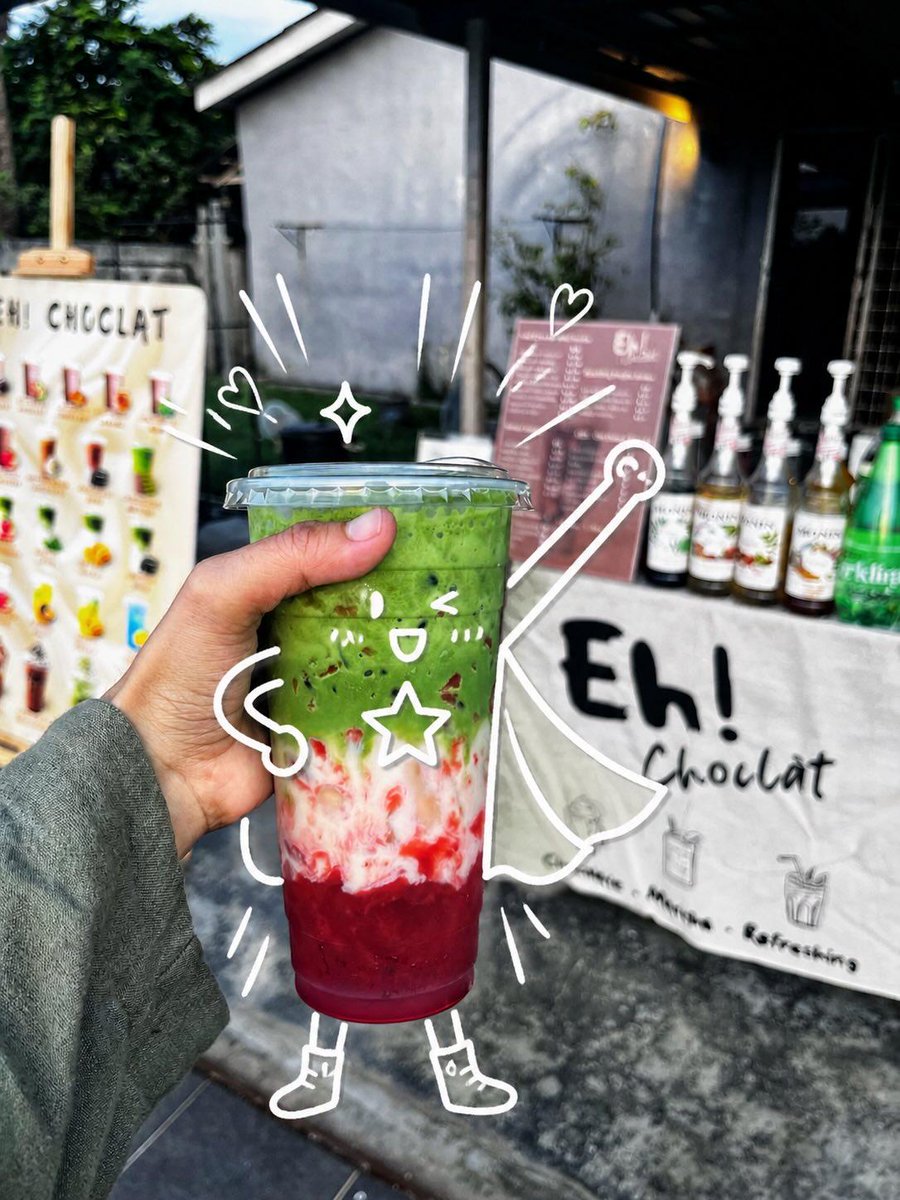
Cute Superhero Drink Doodle Photo
Generates a realistic handheld café drink photo enhanced with playful white doodles that turn the cup into a whimsical superhero character.
这是一个用于 食物饮品 的 gpt-image-2 提示词案例。你可以复制下方 prompt 生成相似图片;商用前请复核 YouMind OpenLab awesome-gpt-image-2 来源归因和原始权利。
提示词
可复制提示词
Create a realistic handheld street-food photo of a layered iced drink in a clear plastic takeaway cup with a domed flat lid, held close to the camera by a left hand wearing a muted gray-green long sleeve. The drink has three vivid layers: a deep ruby-red fruit base at the bottom, a cloudy white creamy middle with red streaks, and a thick bright matcha-green top with small dark specks. Set the scene outdoors in front of a small dessert drink stall, with shallow depth of field and natural daylight; the background should be softly blurred but still show a white sign reading “Eh! Chocolat,” a pink menu board, syrup bottles lined up on the counter, a green bottle at the right, and a colorful menu display at the left. Add playful white hand-drawn doodles directly over the photo so the cup becomes a cute superhero character: one kawaii face on the cup with two eyes, one open smile, two blush-mark groups, and one outlined star on its body; two noodle-like arms, two simple legs, and two small boots; one flowing cape extending to the right; one wand or magic staff with a circular tip; two small hearts, one four-point sparkle, and nine short motion/emphasis strokes around the cup. Keep the doodles casual, imperfect, bright white, and integrated with the subject as if sketched on top of the photograph. Use a vibrant candid smartphone photography look, high contrast, crisp focus on the drink and hand, blurred café-stall background, and a cheerful whimsical mood. Customize the stall sign text as {argument name="stall sign text" default="Eh! Chocolat"}, the drink top color as {argument name="drink top color" default="bright matcha green"}, the drink bottom color as {argument name="drink bottom color" default="deep ruby red"}, the doodle color as {argument name="doodle color" default="white"}, and the sleeve color as {argument name="sleeve color" default="muted gray-green"}.提示词变量
从提示词中识别到的可编辑 argument 占位符及默认值。
变量
stall sign text
默认值
Eh! Chocolat
变量
drink top color
默认值
bright matcha green
变量
drink bottom color
默认值
deep ruby red
变量
doodle color
默认值
white
变量
sleeve color
默认值
muted gray-green
同分类案例
优先推荐同分类、同输入模式且风险更低的案例。


复用与来源说明
看完案例后,再安全复用这个提示词。
- 1.复制 prompt,或点击生成入口在 Dovoo 中直接打开。
- 2.按你的用途调整变量、画面比例和参考图。
- 3.发布或商用前,复核来源权利、归因要求以及品牌、肖像或版权风险。
这个提示词可以商用吗?
当前商业使用状态为 unknown。付费或公开使用前,请复核原始来源、许可、品牌限制和法务要求。
这个案例来自哪里?
该案例导入自 YouMind OpenLab awesome-gpt-image-2;复用时请保留来源归因,并打开来源 URL 检查最新授权信息。