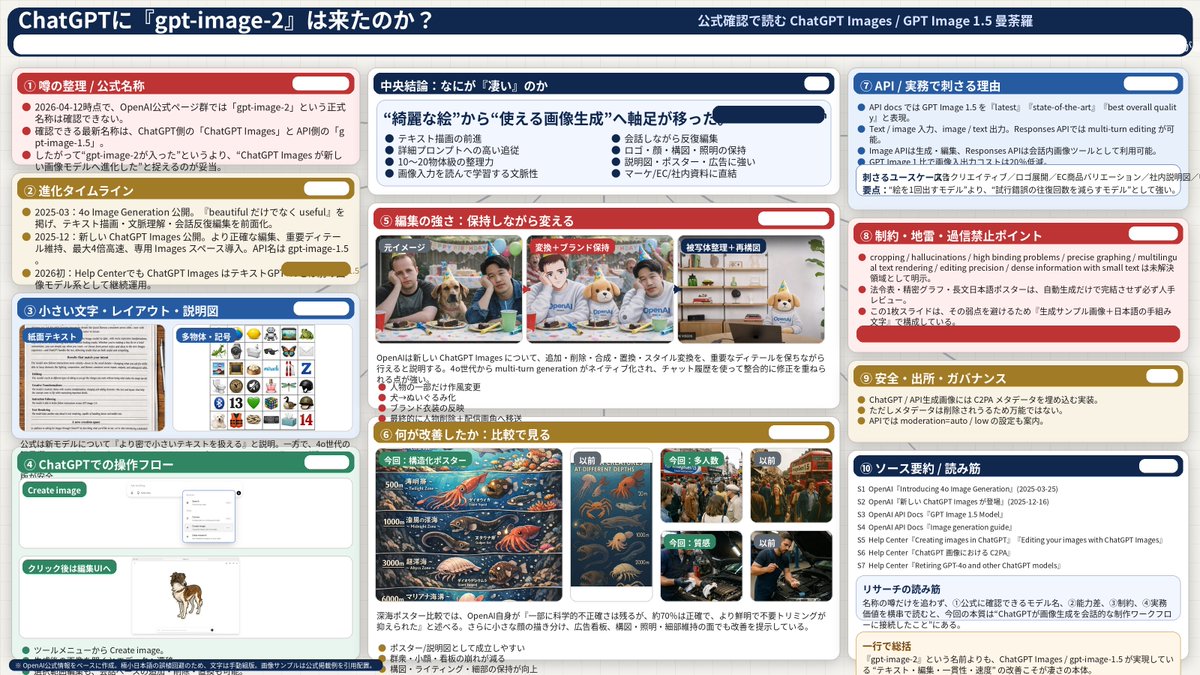
Complex AI Model Analysis Infographic
Generates a highly detailed, 3-column presentation slide analyzing AI model features with 10 distinct sections and embedded comparison images.
这是一个用于 平面海报 的 gpt-image-2 提示词案例。你可以复制下方 prompt 生成相似图片;商用前请复核 YouMind OpenLab awesome-gpt-image-2 来源归因和原始权利。
提示词
可复制提示词
{
  "type": "信息图仪表板",
  "style": "企业演示 Slides,密集信息布局,扁平化设计",
  "header": {
    "left_title": "{argument name=\"main title\" default=\"ChatGPT 是否迎来了『gpt-image-2』?\"}",
    "right_subtitle": "{argument name=\"subtitle\" default=\"通过官方确认解读 ChatGPT Images / GPT Image 1.5 曼荼罗\"}",
    "background_color": "{argument name=\"theme color 1\" default=\"深蓝色\"}"
  },
  "layout": {
    "columns": 3,
    "sections": [
      {
        "id": 1,
        "title": "① 传闻梳理 / 官方名称",
        "color": "{argument name=\"theme color 2\" default=\"红色\"}",
        "content_type": "3 个要点"
      },
      {
        "id": 2,
        "title": "② 进化时间轴",
        "color": "金色",
        "content_type": "3 个时间轴要点"
      },
      {
        "id": 3,
        "title": "③ 小字、布局与说明图",
        "color": "蓝色",
        "content_type": "2 张展示文本文档和图标网格的嵌入式图像"
      },
      {
        "id": 4,
        "title": "④ ChatGPT 操作流程",
        "color": "绿色",
        "content_type": "展示聊天界面和狗图像的 UI 模型"
      },
      {
        "id": "central",
        "title": "核心结论:究竟『厉害』在哪里",
        "color": "深蓝色",
        "subtitle": "{argument name=\"central conclusion\" default=\"重心从“精美图片”转向“实用图像生成”\"}",
        "content_type": "2 列,每列 4 个要点"
      },
      {
        "id": 5,
        "title": "⑤ 编辑能力:在保持原样中进行修改",
        "color": "红色",
        "content_type": "3 张展示照片编辑过程的连续图像"
      },
      {
        "id": 6,
        "title": "⑥ 改进之处:对比分析",
        "color": "金色",
        "content_type": "6 张对比图像(本次 vs 之前),涵盖海报、人群、纹理"
      },
      {
        "id": 7,
        "title": "⑦ API / 实际业务中的核心价值",
        "color": "蓝色",
        "content_type": "3 个要点"
      },
      {
        "id": 8,
        "title": "⑧ 限制、雷区与切忌盲目信任的要点",
        "color": "红色",
        "content_type": "3 个要点"
      },
      {
        "id": 9,
        "title": "⑨ 安全、出处与治理",
        "color": "金色",
        "content_type": "3 个要点"
      },
      {
        "id": 10,
        "title": "⑩ 来源汇总 / 阅读指南",
        "color": "深蓝色",
        "content_type": "7 个来源列表及一个总结框"
      }
    ]
  }
}
提示词变量
从提示词中识别到的可编辑 argument 占位符及默认值。
变量
main title
默认值
Has ChatGPT finally received the 'gpt-image-2' update?
变量
subtitle
默认值
Officially confirmed interpretation of ChatGPT Images / GPT Image 1.5 Mandala
变量
theme color 1
默认值
Dark blue
变量
theme color 2
默认值
red
变量
central conclusion
默认值
The focus has shifted from "beautiful images" to "practical image generation".
同分类案例
优先推荐同分类、同输入模式且风险更低的案例。




复用与来源说明
看完案例后,再安全复用这个提示词。
- 1.复制 prompt,或点击生成入口在 Dovoo 中直接打开。
- 2.按你的用途调整变量、画面比例和参考图。
- 3.发布或商用前,复核来源权利、归因要求以及品牌、肖像或版权风险。
这个提示词可以商用吗?
当前商业使用状态为 unknown。付费或公开使用前,请复核原始来源、许可、品牌限制和法务要求。
这个案例来自哪里?
该案例导入自 YouMind OpenLab awesome-gpt-image-2;复用时请保留来源归因,并打开来源 URL 检查最新授权信息。