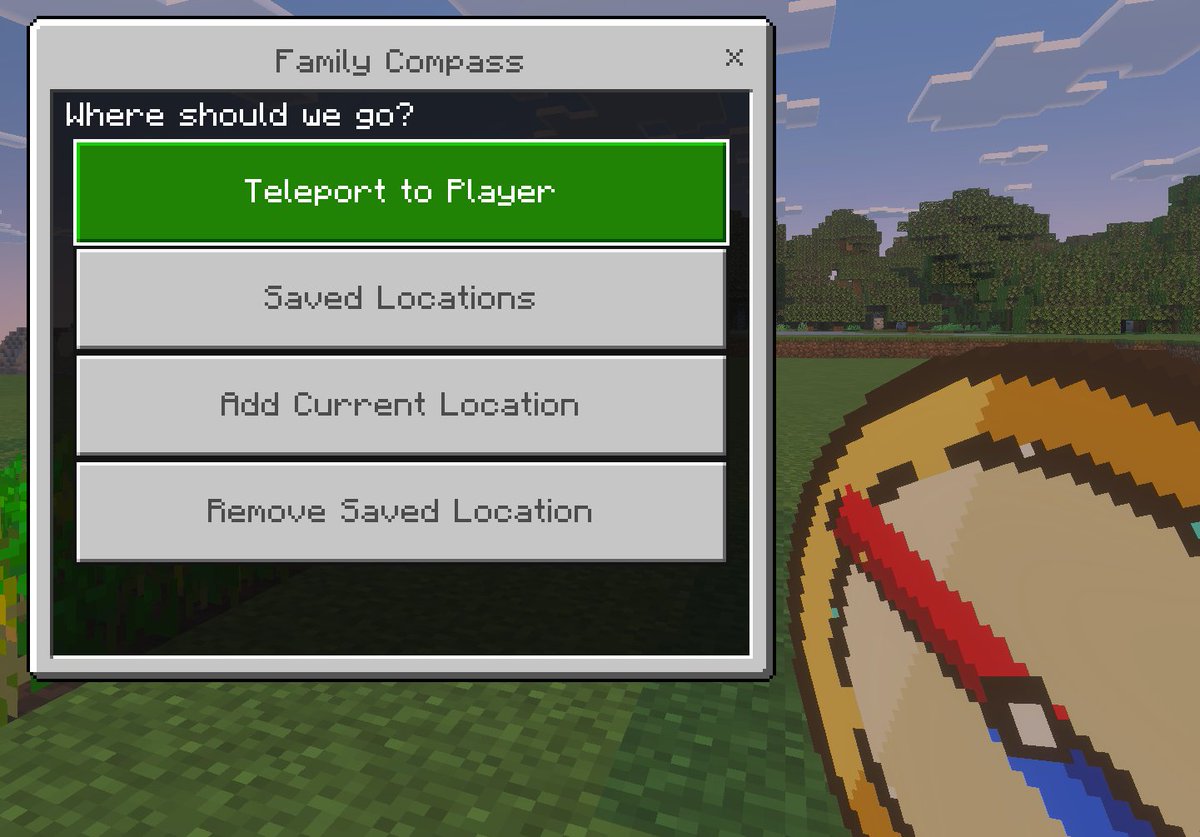
Minecraft Family Compass UI
A Bedrock-style Minecraft screenshot mockup featuring a custom teleport menu and handheld compass, ideal for showcasing a game mod, add-on, or kid-friendly navigation tool.
這是一個動漫與遊戲的gpt-image-2範例。請使用下方可直接使用的提示資訊產生類似的視覺素材,並在重複使用前查看Awesome Nano Banana Pro Prompts署名和商業用途授權資訊。
需要完整的提示符號集?請使用 動漫與遊戲 主題中心提供更多相關範例,或打開 GPT 影像 2 提示庫 有關完整範例索引、可重複使用結構和來源歸屬的資訊。
提示詞
可直接複製的提示
A minimalist in-game screenshot model using the visual style of Minecraft Bedrock Edition, showcasing a titled{argument name="window title" default="Family Compass"} A custom teleport menu overlay. The background is a bright Minecraft outdoor scene, with blocky grass in the foreground, a row of dense trees in the midground, and a light blue sky with rectangular clouds in the distance. On the left side of the screen is a large Bedrock Edition-style UI window with a light gray panel, dark gray border, and a close button "X" in the upper right corner. The title text is centered at the top of the window. The dark title bar inside the panel displays the hint text.{argument name="prompt text" default="Where should we go?"} Below, four large, evenly spaced horizontal rectangular buttons are stacked vertically. The first button is highlighted in bright green with white pixelated text.{argument name="primary button" default="Teleport to Player"} The next three buttons are light gray with medium gray pixel-style text: "Saved Locations," "Add Current Location," and "Remove Saved Location." In the lower right foreground, partially cropped to resemble a player's hand, is a large pixel art compass item with a tan dial, gold border, and a downward-sloping red pointer, rendered in a thick Minecraft item icon style. Please use authentic Minecraft Bedrock Edition UI proportions, pixelated fonts, clean block edges, soft in-game lighting, and a refined screenshot composition with the menu as the visual focus.提示變數
提示符號中可編輯的參數佔位符及其預設值。
多變的
window title
預設
Family Compass
多變的
prompt text
預設
Where should we go?
多變的
primary button
預設
Teleport to Player
此類案例更多
按類別、輸入模式相容性、品質和低風險進行優先排序。


重用和來源註釋
預覽案例後,請謹慎使用此提示。
- 1.複製提示或直接在 Dovoo 中使用生成按鈕開啟提示。
- 2.根據您的實際使用情況調整變數、寬高比和參考影像。
- 3.發布或付費使用前,請確認版權、署名要求以及品牌或肖像權風險。