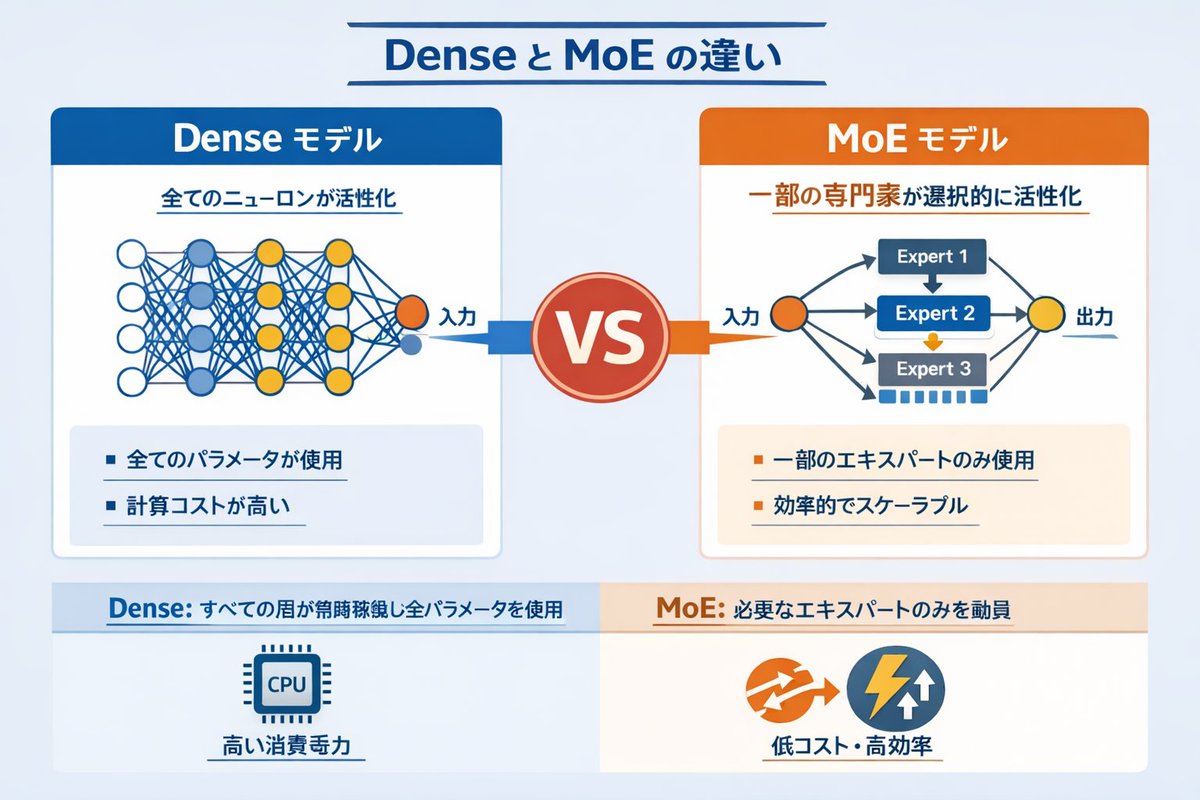
Dense vs MoE Neural Network Infographic
A technical infographic comparing Dense and Mixture of Experts (MoE) AI models with network diagrams and bullet points.
這是一個平面與海報的gpt-image-2範例。請使用下方可直接使用的提示資訊產生類似的視覺素材,並在重複使用前查看Awesome Nano Banana Pro Prompts署名和商業用途授權資訊。
需要完整的提示符號集?請使用 平面與海報 主題中心提供更多相關範例,或打開 GPT 影像 2 提示庫 有關完整範例索引、可重複使用結構和來源歸屬的資訊。
提示詞
可直接複製的提示
{
  "type": "Infographic Comparison Chart",
  "header": {
    "title": "{argument name=\"main title\" default=\"The difference between Dense and MoE\"}"
  },
  "layout": {
    "structure": "The layout is two columns, separated by the VS logo, with a footer at the bottom.",
    "sections": [
      {
        "position": "Left sidebar",
        "theme_color": "blue",
        "header": "{argument name=\"left model name\" default=\"Dense Model\"}",
        "subtitle": "All neurons were activated.",
        "diagram": {
          "type": "Fully connected neural networks",
          "elements": [
            "One orange input node, labeled \"Input\".",
            "There are 4 hidden layers with 4, 5, 4, and 2 nodes respectively.",
            "The node colors are white, blue, and yellow.",
            "Dense cross-connections between all adjacent nodes"
          ]
        },
        "bullet_points": {
          "count": 2,
          "items": [
            "{argument name=\"left bullet point\" default=\"Use all parameters\"}",
            "High computational cost"
          ]
        }
      },
      {
        "position": "Right sidebar",
        "theme_color": "orange color",
        "header": "{argument name=\"right model name\" default=\"MoE model\"}",
        "subtitle": "Selective activation of some experts",
        "diagram": {
          "type": "Hybrid expert network",
          "elements": [
            "One orange input node, labeled \"Input\".",
            "Three rectangular blocks, labeled Expert 1, Expert 2, and Expert 3 respectively.",
            "One yellow output node, labeled \"Output\".",
            "Branching arrows connecting input to expert and expert to output"
          ]
        },
        "bullet_points": {
          "count": 2,
          "items": [
            "{argument name=\"right bullet point\" default=\"Using only some experts\"}",
            "High efficiency and scalability"
          ]
        }
      },
      {
        "position": "center",
        "element": "Red circular badge with the word VS",
        "connections": "The blue arrow points to the left, and the orange arrow points to the right."
      },
      {
        "position": "Left side of the footer",
        "background": "light blue",
        "text": "Dense: All layers run continuously with all parameters.",
        "icon": "Graphics of a CPU chip",
        "label": "High power consumption"
      },
      {
        "position": "Right side of the footer",
        "background": "Light orange",
        "text": "MoE: Only call the necessary experts",
        "icons": "Two circular shapes (orange arrow, blue lightning bolt).",
        "label": "Low cost and high efficiency"
      }
    ]
  }
}
提示變數
提示符號中可編輯的參數佔位符及其預設值。
多變的
main title
預設
The difference between Dense and MoE
多變的
left model name
預設
Dense Model
多變的
left bullet point
預設
Use all parameters
多變的
right model name
預設
MoE model
多變的
right bullet point
預設
Using only some experts
此類案例更多
按類別、輸入模式相容性、品質和低風險進行優先排序。




重用和來源註釋
預覽案例後,請謹慎使用此提示。
- 1.複製提示或直接在 Dovoo 中使用生成按鈕開啟提示。
- 2.根據您的實際使用情況調整變數、寬高比和參考影像。
- 3.發布或付費使用前,請確認版權、署名要求以及品牌或肖像權風險。