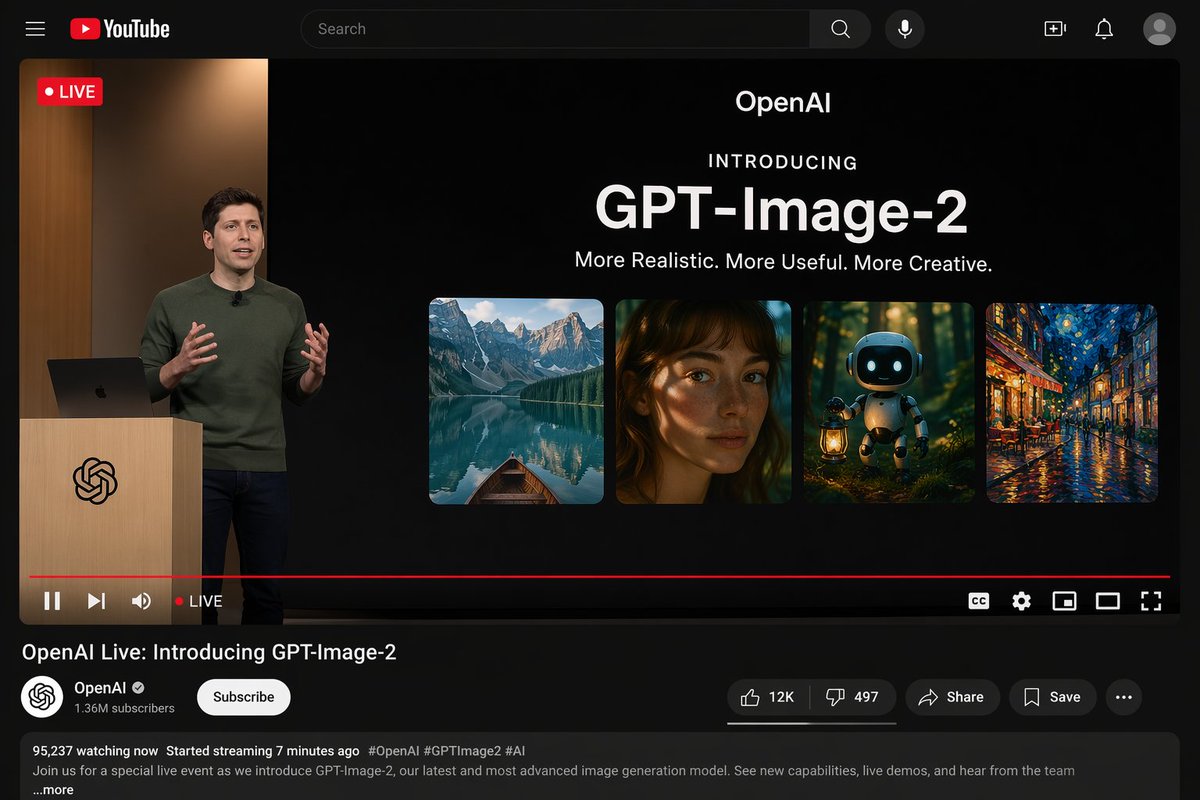
YouTube Live Stream Announcement Mockup
Generates a realistic YouTube dark mode interface showing a live product announcement presentation.
이것은 其他灵感 에 대한 gpt-image-2 프롬프트 사례입니다. 아래의 복사 가능한 프롬프트를 사용하여 유사한 시각 자료를 생성하고, 재사용하기 전에 Awesome Nano Banana Pro Prompts 의 저작자 표시 및 상업적 사용 권한을 검토하십시오.
전체 프롬프트 세트가 필요하신가요? 다음을 사용하세요. 其他灵感 더 많은 관련 예시를 보려면 주제 허브를 열거나 다음을 열어보세요. GPT 이미지 2 프롬프트 라이브러리 전체 예제 색인, 재사용 가능한 구조 및 출처 표기는 다음을 참조하십시오.
프롬프트
복사 준비 프롬프트
{
  "type": "YouTube live streaming interface demo",
  "theme": "Dark mode",
  "layout": {
    "top_bar": {
      "components": [
        "Hamburger menu",
        "YouTube logo",
        "Search bar",
        "microphone icon",
        "Create icon",
        "Notification icon",
        "Personal profile picture"
      ]
    },
    "video_player": {
      "status": "The LIVE logo is displayed in the top left corner.",
      "left_side": "One{argument name=\"presenter description\" default=\"The man wearing a green sweater\"} Standing in front of a wooden lectern with a spiral logo, they are communicating with gestures, and a laptop is placed on the lectern.",
      "right_side_presentation": {
        "text_elements": [
          "OpenAI",
          "Introduced with great fanfare",
          "{argument name=\"product name\" default=\"GPT-Image-2\"}",
          "{argument name=\"tagline\" default=\"More realistic, more practical, and more creative.\"}"
        ],
        "image_gallery": {
          "count": 4,
          "panels": [
            "Mountain lakes with small boats",
            "A close-up portrait of a woman with dappled light and shadow",
            "A cute robot carrying a lantern in the dark forest.",
            "Impressionist paintings of city streets illuminated at night"
          ]
        }
      },
      "bottom_controls": {
        "components": [
          "Play/Pause",
          "Next",
          "volume",
          "LIVE Text",
          "Red progress bar",
          "CC",
          "Set gears",
          "Mini Player",
          "Cinema mode",
          "full screen"
        ]
      }
    },
    "video_info": {
      "title": "{argument name=\"video title\" default=\"OpenAI Live Stream: GPT-Image-2 Officially Launched\"}",
      "channel_section": {
        "name": "{argument name=\"channel name\" default=\"OpenAI\"}",
        "badge": "Authentication checkmark",
        "subscribers": "1.36 million subscribers",
        "button": "Subscribe (white capsule button)"
      },
      "action_buttons": {
        "count": 5,
        "labels": [
          "Likes (12,000)",
          "Dislike (497)",
          "share",
          "keep",
          "..."
        ]
      },
      "description_box": {
        "metadata": "95,237 people are currently watching; the live stream started 7 minutes ago.",
        "hashtags": "#OpenAI #GPTImage2 #AI",
        "body_text": "Welcome to our special live stream event where we'll be showcasing OpenAI's latest and most advanced image generation model, GPT-Image-2. Learn about new features, watch a live demo, and hear from the team…and more."
      }
    }
  }
}
프롬프트 변수
프롬프트에 있는 편집 가능한 인수 자리 표시자와 해당 기본값입니다.
변하기 쉬운
presenter description
기본
The man wearing a green sweater
변하기 쉬운
product name
기본
GPT-Image-2
변하기 쉬운
tagline
기본
More realistic, more practical, and more creative.
변하기 쉬운
video title
기본
OpenAI Live Stream: GPT-Image-2 Officially Launched
변하기 쉬운
channel name
기본
OpenAI
이 범주에 속하는 더 많은 사례
범주, 입력 방식 호환성, 품질 및 위험도에 따라 우선순위가 정해집니다.

재사용 및 출처 참고 사항
사례를 미리 확인한 후 이 안내 메시지를 안전하게 사용하십시오.
- 1.프롬프트를 복사하거나 Dovoo의 생성 버튼을 사용하여 직접 엽니다.
- 2.사용 사례에 맞게 변수, 화면 비율 및 참조 이미지를 조정하십시오.
- 3.출판 또는 유료 사용 전에 저작권, 출처 표기 요건 및 브랜드 또는 초상권 관련 위험을 확인하십시오.